Volunteers, pastors, and operational handoffs
Church social media approval workflow: who drafts, who approves, who posts
A practical approval workflow for church social media at three sizes, with four roles, a weekly rhythm, a review checklist, account-access rules, and a volunteer exit plan.
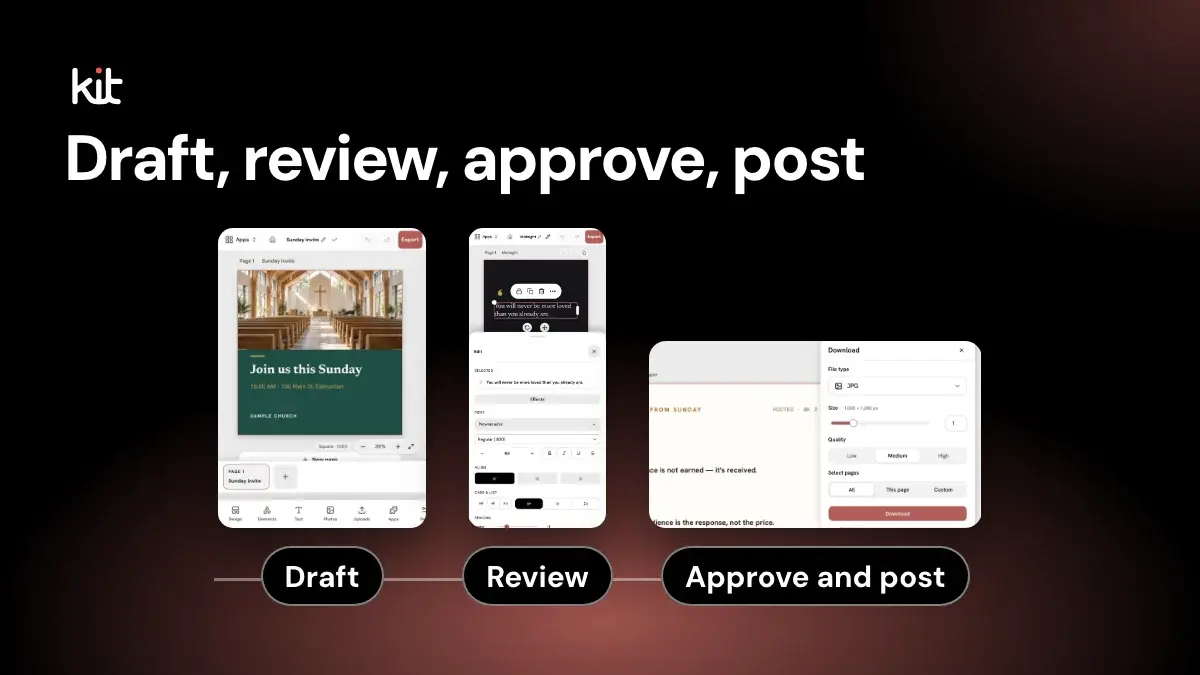
A church social media approval workflow answers four questions for every post. Who drafts it? Who checks it? Who says yes? Who puts it on the account?
Write those four names down, and most approval problems go away. A small church can use two names. A multi-campus church needs more. The questions stay the same.
This article gives the workflow for three sizes of church, a weekly rhythm, a review checklist, and rules for account access. It is about the team and its roles. For the post-level checks, see the review checklist for sermon-based posts. For the one-page record that moves a post between two people, see the pastor-to-volunteer handoff.
What are the four roles in a church social media workflow?
Use four roles. One person can hold more than one, but each role should have a name next to it.
- Drafter. Writes the caption and builds the graphic from the sermon or the announcement.
- Reviewer. Checks the draft against the source and the checklist below. Fixes small errors or sends it back.
- Approver. Decides the post can go public. This person owns the risk, so it is usually a pastor or a communications lead.
- Poster. Puts the approved version on the account at the agreed time and records that it went live.
The rule that holds this together: the drafter does not approve their own post. In a church of two, the pastor and the volunteer swap roles so that each post has a second set of eyes.
How should the workflow change with church size?
The roles stay the same. The people holding them change. Figure 1 shows the flow and a row for each size.
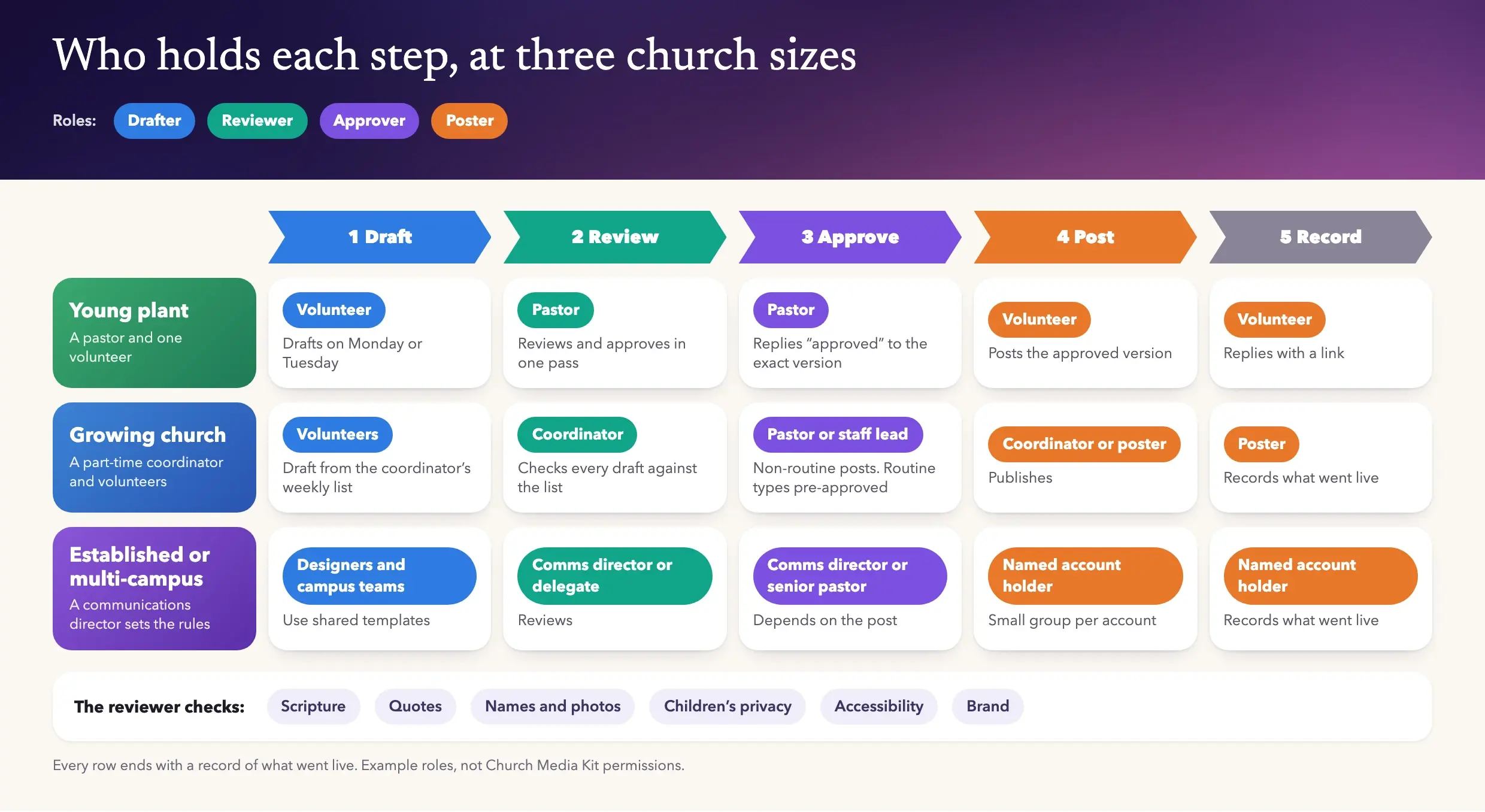
Figure 1. Who holds each step at three church sizes. Every row ends with a record of what went live.
Young plant: a pastor and one volunteer
You have two people. Keep it light.
- The volunteer drafts on Monday or Tuesday.
- The pastor reviews and approves in one pass, in a message thread, by replying "approved" to the exact version.
- The volunteer posts and replies with a link.
Approve the finished image and caption, not the plan; see the handoff post. In Church Media Kit, two people fit within the two Seats on the Starter plan; Seats count active Team Members and pending invitations, as listed on the pricing page.
Growing church: a part-time coordinator and volunteers
Now you have a coordinator and a few helpers. The coordinator becomes the reviewer.
- Volunteers draft against a weekly list the coordinator sets.
- The coordinator reviews every draft against the checklist and fixes small errors.
- A pastor or staff lead approves anything that quotes the pastor, names a person, or touches a sensitive topic. Routine posts, such as a service reminder with the times already confirmed, can be pre-approved as a type.
- The coordinator or a named poster publishes.
Write down which post types are pre-approved. This saves review time, because it stops the pastor reviewing every verse graphic.
Established or multi-campus church
Here the problem is consistency and speed, not just safety. A communications director sets the rules. Designers build the shared templates. Campus pastors or campus leads supply local facts.
- Designers and campus teams draft, using shared templates.
- The communications director, or a delegate, reviews.
- Approval depends on the post. Brand and routine posts end with the communications director. Anything about the senior pastor's teaching, a crisis, or a policy goes to the senior pastor or executive team.
- A small, named group holds posting access for each account.
The failure mode is the campus that bypasses the process because it is faster. The next sections show how to make the process faster than the bypass.
Plan the workflow for your own team:
Approval workflow planner
Tell us your team and how much the pastor wants to approve, and get a swimlane, a week plan and a review load.
Your plan
Growing church workflow
4 people, 1 campus, 7 posts a week.
Who does each step
- Drafter
Volunteers
- Draft (this role)
- Review (not this role)
- Approve (not this role)
- Post (not this role)
- Record (not this role)
- Reviewer
The part-time coordinator
- Draft (not this role)
- Review (this role)
- Approve (not this role)
- Post (not this role)
- Record (not this role)
- Approver
Pastor or staff lead: sensitive posts; routine types pre-approved
- Draft (not this role)
- Review (not this role)
- Approve (this role)
- Post (not this role)
- Record (not this role)
- Poster
The coordinator or a named poster
- Draft (not this role)
- Review (not this role)
- Approve (not this role)
- Post (this role)
- Record (this role)
Every row ends with a record of what went live. The drafter never approves their own post.
Your week, Monday to Sunday
Mon
- DrafterPull the sermon source and list the week’s posts
- EveryoneTen-minute look back
Tue
- DrafterDrafts ready
- ReviewerCheck 7 drafts
Wed
- ApproverSign off the sensitive posts (about 2)
Thu
- PosterPost 1, then record it
Fri
- PosterPost 2, then record it
Sat
- PosterPost 2, then record it
Sun
- PosterPost 2, then record it
- PosterNext Sunday’s invite goes last
Approval is batched once a week, so the approver gets one review session and the drafter gets one deadline.
Estimated review load per week
Reviewer
35 min
Approver
4 min
Posts the approver sees
2 of 7
How we estimate it
- Reviewer = 5 minutes per post for the checklist, plus 10 minutes for each campus beyond the first to check local facts.
- Approver = 2 minutes per post they see: every post, about a quarter of posts (those that quote the pastor, name a person or touch a sensitive topic), or none.
These are our planning assumptions, not a study. Time your own first week and adjust.
The reviewer’s checklist
- 1Scripture accuracyReference, text and translation match a trusted source.
- 2Quotes in contextA sermon quote is exact or marked as a paraphrase, and the meaning is not reversed.
- 3Names and photosAnyone named or shown has agreed, checked against the consent record.
- 4Children’s privacyFollow your safeguarding policy: no full names or identifying details with photos of minors.
- 5AccessibilityReadable text, clear contrast and alt text on the image.
- 6BrandLogo, colours, fonts and church name are correct.
Have the reviewer sign it. Your denomination, insurer or safeguarding lead may add to it, and their rules come first. For anything sensitive, nobody posts until the senior pastor or designated lead says so, by name, in writing.
Suggested Church Media Kit roles
DrafterEditor
Can generate and edit shared drafts and download the designs they can edit.
ReviewerAdmin
Can manage Editors and Publishers. Only the Owner manages Admins.
ApproverOwner
Usually the pastor or lead. There is no built-in approval chain, so approval stays in your own process.
PosterEditor
Editors can download every design they can edit. Add Publisher only for people who also publish Church in bio changes.
4 people fit within the 5 Seats on the Growth plan. Seats count active Team Members and pending invitations.
Church Media Kit makes the posts; your team posts them. Church Media Kit does not post for you today: you download the graphics and post them yourself.
Want this tool on its own page? Open the free approval workflow planner. For the wider picture, see our guide to church graphics.
What is a weekly rhythm from Sunday sermon to the week's posts?
A rhythm makes approval predictable. Here is one that works at any size:
- Sunday or Monday: the drafter pulls the sermon source, such as the recording, captions, or the pastor's notes, and lists the week's posts.
- Tuesday: drafts are ready. The reviewer checks them.
- Wednesday: the approver signs off on the batch, or on the non-routine posts.
- Thursday to Sunday: the poster publishes on the agreed days. The invitation post for next Sunday goes last.
- Monday: a ten-minute look back. What went live, what was corrected, what to change.
Batching approval once a week is better than approving one post at a time. The approver gets one review session, and the drafter gets one deadline.
For the content side of this rhythm, see the weekly sermon content rhythm.
What should the reviewer check?
Use a short checklist, and have the reviewer sign it. Six checks cover most of the risk.
- Scripture accuracy. The reference, the text, and the translation match a trusted source.
- Quotes in context. A sermon quote is exact or clearly marked as a paraphrase, and does not reverse the meaning.
- Names and photos. Anyone named or shown has agreed to it. Use the church's consent record, not memory.
- Children's privacy. Follow your safeguarding policy. A common rule is no full names and no identifying details with photos of minors, and no posting without parental consent.
- Accessibility. The text is readable, the contrast is clear, and the image has alt text.
- Brand. Logo, colors, fonts, and church name are correct.
This is a starting list. Your denomination, insurer, or safeguarding lead may add to it. Treat their rules as the higher authority.
Which brand elements should be locked, and which should campuses change?
Lock what makes the church recognizable. Leave open what only a campus knows.
- Locked: logo, color pairs, fonts, the church name, the footer line, and the layout of shared templates.
- Local fields: campus name, address, service times, the campus pastor's name, a local photo, and the local call to action.
The designer builds the template once, with the local fields clearly marked. The campus fills in the fields and does not move the logo. If a campus needs an exception, write it down with an end date. The minimum church brand guide covers what to put on the one page.
In Church Media Kit, one Church has one Brand Kit: up to six colors and a heading and body font, with the logo set from the Organization Profile. Owners and Admins change the logo. Anyone who can edit a design can still change the layers on it, so the brand lock is a team agreement, not a software restriction. Church Media Kit does not give campuses separate local fields or approval locks.
How do you handle sensitive topics?
Decide in advance what skips the normal path. Examples: a death in the congregation, an accident, a news event, a political or social issue, a staff departure, a lawsuit, abuse allegations, and a prayer request that names someone.
For these, the rule is simple. Nobody posts until the senior pastor or designated lead says so, by name, in writing. The reviewer's job is to spot the topic and stop the post. Scheduled posts that might look tone-deaf after breaking news also need a named person who can pause them. Put the phone number of that person in the workflow document.
If the post names a person or family, get their permission first, even if the news is public.
How should you manage account access and passwords?
Do not share one login. Give each person their own access, and keep the least that works.
At the time of writing, Meta's help describes "Facebook access" with full control or partial control, separate from task access through tools such as Meta Business Suite. Full control adds Page settings and managing other people's access. Partial control covers content, messages and comments. Per Meta's help, only people with full control can add or remove access. See Meta's guides on Page access and how to give, edit or remove Page access. Keep at least two people with full control, so a single lost phone does not lock the church out.
Turn on two-factor authentication on every account with posting power. At the time of writing, Instagram's help lists an authentication app, text message and WhatsApp as two-factor methods, and says to save backup codes. We could not re-read that page, so confirm the current options there. See Instagram's two-factor guide.
Basic hygiene:
- No shared personal passwords by text or email.
- Use a password manager that the church owns.
- Keep a short list of who has access to which account, and review it twice a year.
- Use church email addresses for recovery where you can, not a volunteer's personal address.
Inside Church Media Kit, access follows four fixed roles. The Owner manages the team and billing. Admins can manage Editors and Publishers. Publishers, Admins and the Owner can publish Church Page changes; Editors cannot. Social posts are posted by people outside Church Media Kit today. Editors can generate and edit shared drafts and download the designs they can edit. Exporting a file does not give anyone publishing access. Only the Owner manages Admins. There are no custom roles and no built-in approval chain, so the review and approval steps above still happen in your church's own process.
Posting to social platforms is done by people. Church Media Kit does not post for you today; you download the graphics and post them yourself. Facebook and Instagram publishing is coming soon.
What do you do when a volunteer leaves?
Make this a checklist you run the same day, not a conversation you plan to have.
- Remove them from every Page and account where they had access, using the platform's access settings.
- Remove them from the church's Church Media Kit Team. Admins can remove Editors and Publishers; only the Owner can remove an Admin.
- Change any shared passwords they knew, and rotate the recovery email or phone if they held it.
- Ask for their drafts, source files, and the content calendar, and save them in the church's shared folder.
- Reassign their open tasks, and tell the approver who now holds their role.
- Thank them for serving.
Files someone has already downloaded cannot be recalled, so the written consent and brand rules matter more than any setting.
Start with one sermon
Prepare clips and post text for your church to review.
A free account needs no card. Choose the plan whose included Seats cover your team.
Frequently asked questions
Does a small church need a social media policy?
A one-page version, yes. Name the four roles, list the sensitive topics, and list who has account access. That is enough to start.
Who should approve church social media posts?
Whoever carries the pastoral or reputational risk, usually a pastor or a communications lead. See the handoff post.
Can Editors in Church Media Kit publish?
No. Editors can edit shared drafts and download designs they can edit. Publishers, Admins and the Owner can publish Church Page changes; Editors cannot. Social posts are posted by people outside Church Media Kit today.