Volunteers, pastors, and operational handoffs
Sermon notes template: a simple fill-in page your church can print or share
What sermon notes are, plus a free fill-in template to paste into any editor, a filled example, tips for writing blanks, small group questions, and accessibility.
Sermon notes are the written record of a sermon. Most churches mean the handout or page a listener fills in during the message. Preachers also use the phrase for their own outline or manuscript.
This guide starts with the congregation's page, because that is what most people searching for a template want. You get a template to copy, a filled example, and advice on writing blanks, building small group questions, and making the page easy to read. A short section at the end covers the preacher's own notes.
What are sermon notes?
For a congregation, sermon notes are a guided page for the person in the seat. It has the title, the scripture, the main points with some words left blank, and space to write. People fill in the blanks as they listen, then use the page during the week.
For a preacher, sermon notes are the outline or manuscript the sermon is preached from. That is a different tool for a different job. If you want one, see the last section below.
Both kinds should come from the same place: the sermon's one big idea. If the handout says something the sermon never said, the listener notices.
A copy-ready sermon notes template
Copy this into any editor, such as a word processor, a design tool or an email. Replace the text in square brackets and keep the blanks.
# [Sermon title]

[Date] · [Speaker] · [Series, if any]

## Scripture
[Book chapter:verse–verse] ([translation])
[Paste the verse text here, if your translation license allows it.]

## Big idea
[One sentence from the sermon, with the key word as a blank.]
Example: God's ________ is enough for today.

## Point 1: [heading]
[One sentence with one blank.] ________

## Point 2: [heading]
[One sentence with one blank.] ________

## Point 3: [heading]
[One sentence with one blank.] ________

## This week I will
[One practical step.] ____________________

## Prayer
Lord, I bring you ____________________.
Thank you for [one truth from the sermon]. Amen.

## Talk about it
1. [A question about what the passage says]
2. [A question about what it means]
3. [A question about what to do]

## Next steps
[One invitation: a group, a prayer meeting, a link or a QR code.]
The template is deliberately short. A page that fits on one side gets used. A page with ten blanks gets abandoned by the second point.
Fill in your own notes page with the builder:
Sermon notes builder
Fill in the blanks, pick the words to hide, then copy or print a one-page sermon notes sheet.
Sermon notes
Peace That Guards
Philippians 4:6–7 (World English Bible)
“In nothing be anxious, but in everything, by prayer and petition with thanksgiving, let your requests be made known to God. And the peace of God, which surpasses all understanding, will guard your hearts and your thoughts in Christ Jesus.”
Big idea
When we bring our worries to God in , his guards our hearts and minds.
Point 1: Paul says “in be anxious,” but “in ” bring it to God by prayer.
Point 2: Our requests come with .
Point 3: God’s peace will our hearts and thoughts.
This week I will
Bring this worry to God by name:
Prayer
Lord, I bring you . Thank you for your peace. Amen.
Talk about it
- 1. Where do you notice worry first: in your thoughts, your body or your plans?
- 2. What changes when you add thanks to a hard prayer?
- 3. Who could pray with you this week?
Notes and questions online: example.church/notes
6 blanks on the page. About six, all the same length.
Plain-text version
# Peace That Guards

## Scripture
Philippians 4:6–7 (World English Bible)
“In nothing be anxious, but in everything, by prayer and petition with thanksgiving, let your requests be made known to God. And the peace of God, which surpasses all understanding, will guard your hearts and your thoughts in Christ Jesus.”

## Big idea
When we bring our worries to God in __________, his __________ guards our hearts and minds.

## Point 1
Paul says “in __________ be anxious,” but “in __________” bring it to God by prayer.

## Point 2
Our requests come with __________.

## Point 3
God’s peace will __________ our hearts and thoughts.

## This week I will
Bring this worry to God by name: ____________________

## Prayer
Lord, I bring you __________. Thank you for your peace. Amen.

## Talk about it
1. Where do you notice worry first: in your thoughts, your body or your plans?
2. What changes when you add thanks to a hard prayer?
3. Who could pray with you this week?

## Next steps
Notes and questions online: example.church/notes
Want this tool on its own page? Open the free sermon notes builder. For the wider picture, see our guide to sermon series ideas.
A filled example
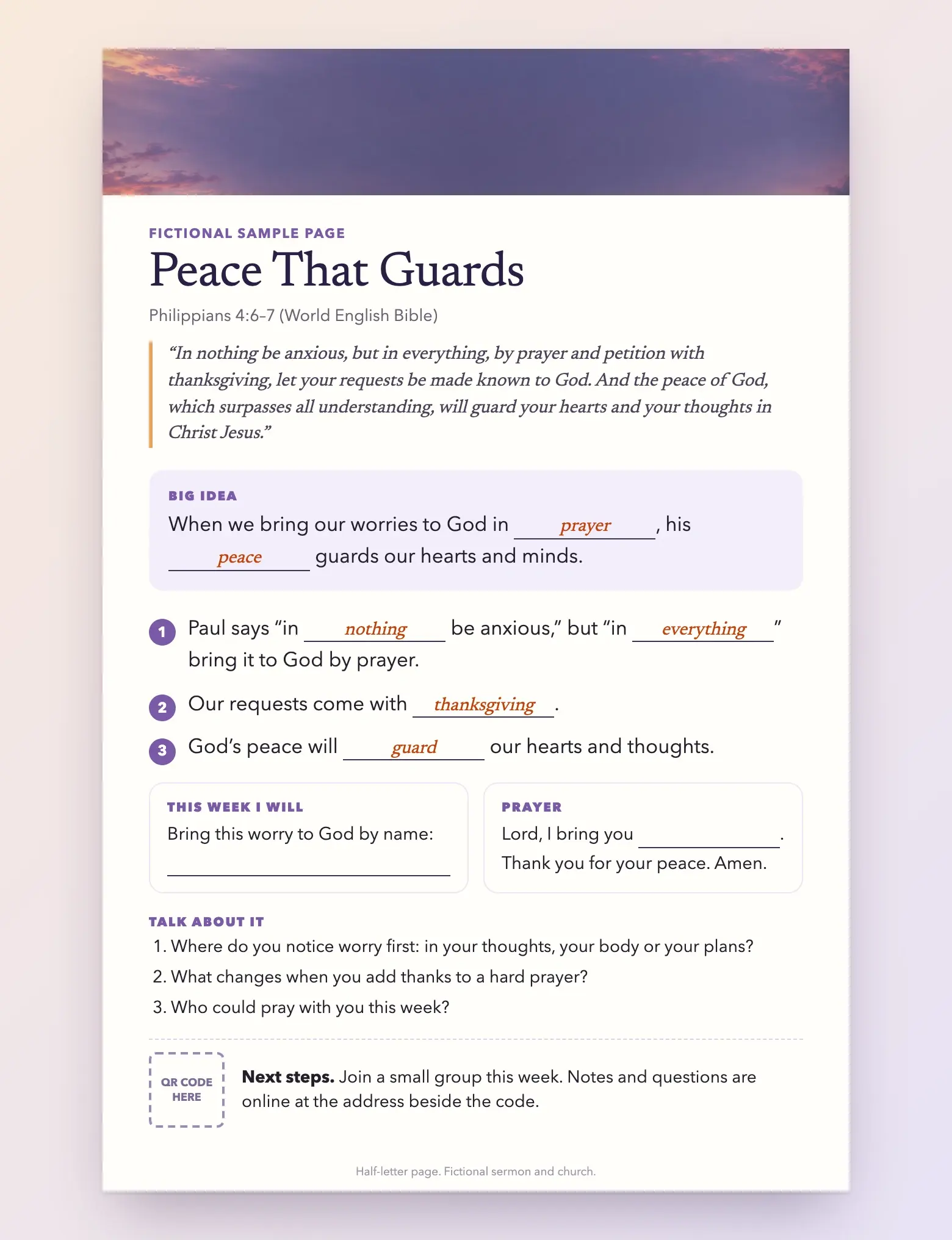
This example is fictional. It is not a real sermon or a real church. The scripture is Philippians 4:6–7 from the World English Bible, which is public domain. The words in bold are the ones a listener fills in.
Peace That Guards Philippians 4:6–7 (World English Bible)
"In nothing be anxious, but in everything, by prayer and petition with thanksgiving, let your requests be made known to God. And the peace of God, which surpasses all understanding, will guard your hearts and your thoughts in Christ Jesus."
Big idea: When we bring our worries to God in prayer, his peace guards our hearts and minds.
- Paul says "in nothing be anxious," but "in everything" bring it to God by prayer.
- Our requests come with thanksgiving.
- God's peace will guard our hearts and thoughts.
This week I will: Bring this worry to God by name: ________
Prayer: Lord, I bring you ________. Thank you for your peace. Amen.
Talk about it: (1) Where do you notice worry first: in your thoughts, your body or your plans? (2) What changes when you add thanks to a hard prayer? (3) Who could pray with you this week?
Next steps: Join a small group this week. Notes and questions are online at the address beside the code.
Here is the same example laid out as a half-letter page.
How to write good fill-in blanks
Blanks work when they ask the listener to catch the point. They fail when they test whether someone was paying attention to filler.
- Blank the word that carries the point. "God's ________ is enough" asks for a key word. "God's grace is ________ for today" asks for a word anyone could guess.
- Use one blank per sentence, two at most.
- Keep the page to about six blanks. Fewer blanks leave room to listen.
- Make every blank the same length. A long blank gives away a long answer, and a short one is hard to write in.
- Use the exact wording the preacher will say. Check the page against the sermon, not against an earlier draft.
- Show the answers. Put the filled words on a slide, or on the online version of the page, so a missed blank is easy to fix.
- Leave real writing space. A blank is not the only place a person writes. Add a line or two for their own notes.
Research on "guided notes", which are partly completed handouts, suggests they can help students get more of the key points down. A 2009 meta-analysis of guided notes reported better note-taking accuracy and performance, mainly with school-age students. It did not study sermons, so treat it as a reason to try the format, not a promise of results.
Turn the notes into small group questions
The notes already contain what a group needs. Take each point and ask three things:
- What does the passage say? "What does Paul tell us to bring to God?"
- What does it mean? "Why do you think Paul adds thanksgiving?"
- What do we do about it? "Who could pray with you this week?"
That gives you up to nine questions. Keep the best six to eight, in an order that moves from the page to life. Put them on the handout, in the group email, or both.
Always read the questions before groups see them. They should follow what the preacher said, and they should leave room for people who disagree or are unsure.
With Sermon Uploads by Church Media Kit, you upload a video of the sermon (MP4 or MOV). It writes a summary with key points, 6 to 8 discussion questions and a small group guide from the transcript. The guide has a title, 3 to 5 key takeaways, questions, one application and a closing prayer. These are drafts that someone on your team should review, and you can copy them into your own handout. It does not produce a fill-in notes page, so you would still lay out the page yourself. See the small group questions page for what it produces.
Start with one sermon
Prepare clips and post text for your church to review.
A free account needs no card, and your first Sermon Uploads upload is free: one sermon up to two hours.
Digital or printed?
Offer both if you can. Research does not give a clear winner for taking notes. An Association for Psychological Science summary of a 2021 replication found no immediate advantage for writing notes by hand over typing them. So let people choose what suits them.
- Printed: Put the page in the bulletin or on seat backs. Print a few large-print copies as well. Design by Church Media Kit has Letter and Half-letter bulletin print sizes, so you can lay the page out and download it for printing.
- Digital: Publish the same words as real text on a page, not as a photo or scan. A phone is where many people will read it.
- QR code: Put a QR code on the printed page that opens the digital version. Print the short link next to the code, so people who cannot scan it can still type it.
Keep the two versions identical. If the printed page and the online page differ, someone will fill in the wrong word.
Make it readable for everyone
A notes page is for the whole room, including older readers and people with low vision.
- Use a plain sans-serif typeface at 12 point or larger. For more detail, see the RNIB's clear print guidance. Keep a large-print copy for anyone who asks.
- Use strong contrast. Dark text on a white or pale page. The WCAG contrast guidance sets 4.5:1 as the minimum for ordinary text.
- Do not put text over photos. Keep the page plain. Our guide to accessible church graphics covers contrast and alt text in more detail.
- Share real text online. W3C guidance on images of text explains why text in an image is harder for people to resize and for screen readers to read.
- Do not rely on color alone. Mark the blanks with a line, not just a color.
- Leave white space. A crowded page is hard to write on.
If you mean the preacher's notes
A preacher's notes need different things: the full text or a detailed outline, the transitions, the stories and the timing. They usually stay with the preacher. Many preachers write the congregation's handout from the finished sermon, taking the big idea and three points and turning the key words into blanks. If you write the page after the sermon is final, the two will match.
If you want more ways to use the sermon during the week, see our weekly sermon workflow and the guide to repurposing a sermon without losing its point.
Sources
- Konrad, Joseph and Eveleigh, A Meta-Analytic Review of Guided Notes (2009) covers guided notes in school settings.
- Association for Psychological Science, Don't Ditch the Laptop Just Yet summarizes the 2021 replication of the laptop versus longhand study.
- RNIB product guidelines give clear print and contrast guidance.
- W3C: Contrast (Minimum) and Images of Text explain the accessibility criteria.
- World English Bible is the public-domain translation used in the example.