Product evaluation and buying decisions
Church presentation software compared: ProPresenter, Proclaim, EasyWorship, FreeShow and more
A vendor-sourced comparison of church presentation software: ProPresenter, Proclaim, EasyWorship, FreeShow, OpenLP and PowerPoint, with prices checked on 15 October 2026.
For most churches the choice comes down to three questions: how much you can spend, how many screens you run, and who clicks the slides on Sunday. ProPresenter is the power option. EasyWorship and Proclaim sit in the middle. FreeShow and OpenLP are free. PowerPoint, Google Slides or Keynote are enough for many small teams.
This guide compares them using each vendor's own pages. Prices were last checked on 15 October 2026. Plans change, so confirm before you buy.
Scope and method
The Church Media Kit team makes Church Media Kit and has a commercial interest in this topic. Church Media Kit is not live presentation software, so none of the tools below is a direct competitor to it. We read each vendor's public pages while logged out, and quote a price only where the vendor's own page showed it. Where a vendor page did not show a price or detail, we write "see vendor". We did not install or test any of these tools, so we describe what vendors say, not how the software performs on a Sunday.
What does church presentation software do?
It puts song lyrics, Bible verses, announcements, videos and backgrounds on your screens during the service, and lets an operator move through them live. Most tools also handle a second "stage" screen for the band and, in some cases, a live stream or broadcast feed.
That is different from building the slides. Presentation software runs the service. A design tool or a sermon-slide builder makes the content you run in it.
The comparison at a glance
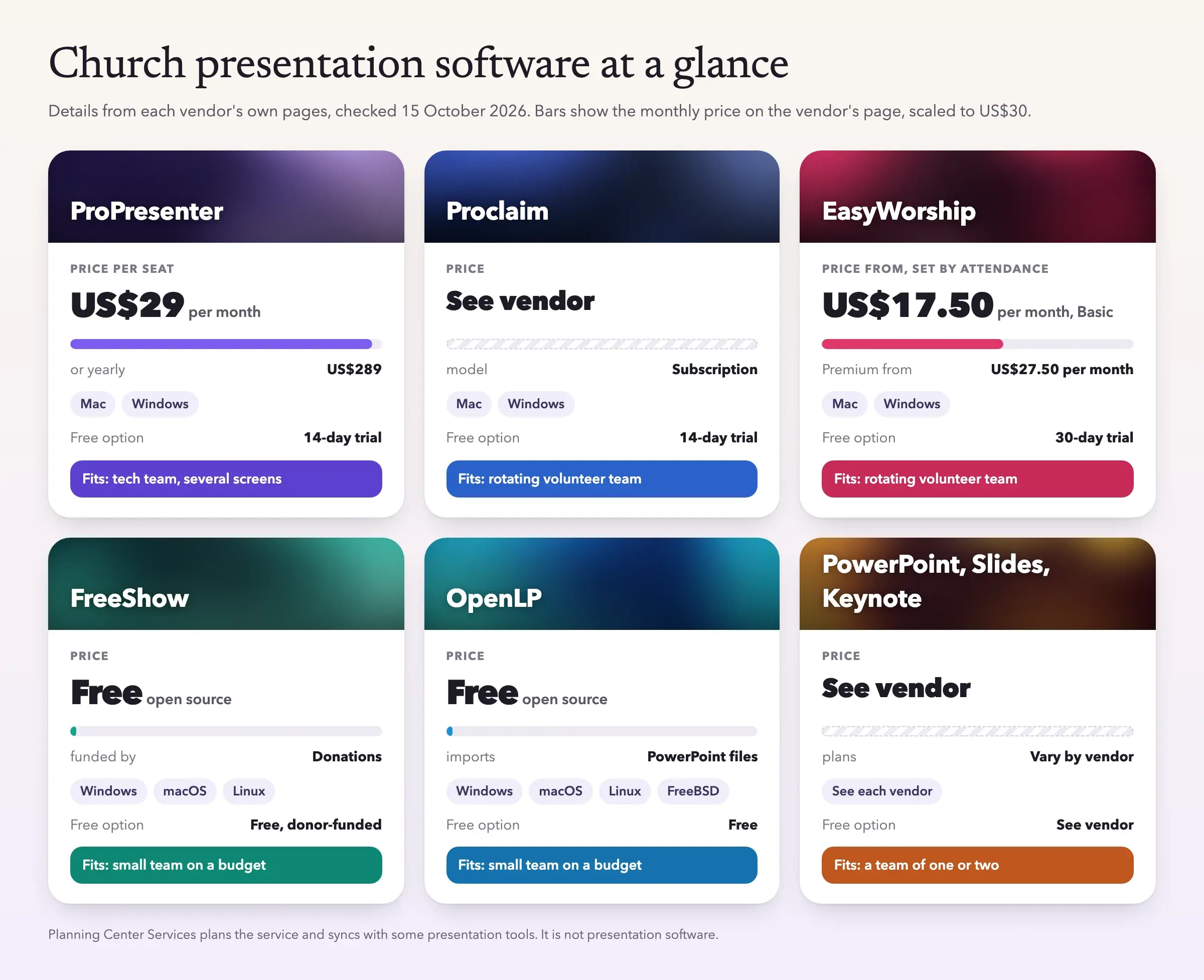
| Tool | Runs on | Price model (checked 15 Oct 2026) | Free option |
|---|---|---|---|
| ProPresenter | Mac, Windows | Subscription: US$29 per month or US$289 per year, per seat | 14-day trial |
| Proclaim | Mac, Windows | Subscription; see vendor | 14-day trial |
| EasyWorship | Mac, Windows | Subscription: from US$17.50 per month (Basic) or US$27.50 per month (Premium), set by attendance | 30-day trial |
| FreeShow | Windows, macOS, Linux | Free, open source | Free, donor-funded |
| OpenLP | Windows, macOS, Linux, FreeBSD | Free, open source | Free |
| PowerPoint, Google Slides, Keynote | See each vendor | See vendor | See vendor |
ProPresenter
ProPresenter from Renewed Vision is built for live production. Its page lists up to eight unique outputs, key and fill outputs for broadcast graphics, stage screens, macros, and sync with Planning Center. It lists Bibles in more than 130 translations, some sold separately.
Renewed Vision's support pages give minimum systems of macOS 13.5 and Windows 10 version 1903.
On price, the vendor page showed US$29 per month or US$289 per year per seat, with a 14-day free trial. Contact the vendor for more than ten seats.
It lists the most features of the tools here, so plan time to train volunteers. Multiple outputs and automation are more than a first-time volunteer needs.
Faithlife Proclaim
Proclaim is cloud-based. The vendor says one subscription covers your whole team, with unlimited installs and seats. Its page lists motion backgrounds, lyric animations, quick screens for last-minute changes, song import from SongSelect, multi-screen output with NDI and SDI, and a remote app. It also lists a link to the Logos Bible study platform.
Proclaim offers a 14-day free trial with no card. We could not read a pricing page, so for the current price see the vendor. Its support FAQ says it runs on Mac and Windows.
It suits teams that plan and edit together and want the library of graphics included. If your church already uses Logos, the Bible link is a natural fit.
EasyWorship
EasyWorship sells two subscription plans for Windows and Mac. Basic starts at US$17.50 per month, or US$210 billed yearly. Premium starts at US$27.50 per month, or US$330 billed yearly. The page says the price depends on your average weekly attendance, and it does not list the tiers, so your price may differ.
Premium adds a bundled media library. Both plans include a campus license for multiple computers at one location, a 30-day trial with no card, and live onboarding with a trainer. That onboarding may help for a volunteer team starting from scratch.
FreeShow
FreeShow is free and open source, and the project says it is funded by donations. Its page describes lyric search that builds slides, scripture lookup, media backgrounds, several outputs with different looks, NDI output, and remote control from a phone or tablet. The downloads page lists Windows, macOS and Linux.
The code is under the GPL-3.0 license, per its GitHub page. Free software means free support from the community, not a vendor help desk. Check that the version you install works with your screens before the week you need it.
OpenLP
OpenLP is also free and open source. Its page lists songs, Bibles, media playback through VLC, custom slides, and the ability to import and control PowerPoint and LibreOffice Impress files. It runs on Windows, macOS, Linux and FreeBSD, with a remote control for phones and tablets and a stage view on any networked device.
The PowerPoint import matters if your sermon slides live in PowerPoint but your songs and Bibles live in OpenLP.
Planning Center and the PowerPoint route
Planning Center Services is not presentation software. It describes itself as service planning and volunteer scheduling. Its plans are priced by the number of people who access it, from a free plan for five members up to an unlimited plan at US$239 per month. It matters here because ProPresenter's page lists Planning Center sync. Check each tool's own page before you rely on any integration.
PowerPoint, Google Slides and Keynote are the simple option. You already know them, there is nothing new to learn, and one person can run a whole service from a laptop. You give up lyric databases, stage displays and live Bible lookups, so you build every slide by hand. Pricing and plans vary by vendor, so see their pages.
How do you choose by church size and team?
A young church plant, or a team of one or two. Start with PowerPoint, Google Slides or Keynote if you have nothing yet. Move to FreeShow or OpenLP when typing lyrics by hand becomes the weekly chore. Both are free, so the only cost is setup time.
A growing church with a rotating volunteer team. Look at EasyWorship or Proclaim. Both advertise team-friendly features, and EasyWorship's trainer and Proclaim's shared account cut down hand-offs. Use the trial period on a real Sunday before you pay.
An established church with a tech team. If you run several screens, a stage display or a broadcast feed, ProPresenter's feature list matches that need. Budget for training the volunteers who will run it, not just the license.
A tool is only as good as the person running it on Sunday morning. Pick the one your least technical regular volunteer can run, then test it on a real service.
Get a ranked shortlist for your own church:
Presentation software chooser
Pick your computers, budget, team and needs to get a ranked shortlist with a yearly cost for your seats.
Pick none to see every tool.
Your shortlist, best fit first
EasyWorship, then FreeShow, then OpenLP
Why EasyWorship ranks first: it scores 7 points. Runs on Windows. Inside your US$300 budget. Vendor lists lyrics and scripture. Both plans include live onboarding with a trainer, and a 30-day trial with no card.
- 7 pts
Number 1: EasyWorship
Two subscription plans with a campus license for several computers at one location.
Estimated yearly cost
From US$210 a year (Basic) or US$330 (Premium), one campus license
Why it fits
- Runs on Windows
- Inside your US$300 budget
- Vendor lists lyrics and scripture
- Both plans include live onboarding with a trainer, and a 30-day trial with no card.
What to check
- The price depends on your average weekly attendance and the tiers are not listed, so yours may differ.
- Premium adds a bundled media library.
- 5 pts
Number 2: FreeShow
Free and open source, with lyric search, scripture lookup and several outputs.
Estimated yearly cost
Free
Why it fits
- Runs on Windows
- Free, so inside any budget
- Vendor lists lyrics and scripture
What to check
- Free software means community support, not a vendor help desk.
- Test it with your screens before the week you need it.
- 5 pts
Number 3: OpenLP
Free and open source, with songs, Bibles and a stage view on any networked device.
Estimated yearly cost
Free
Why it fits
- Runs on Windows
- Free, so inside any budget
- Vendor lists lyrics and scripture
What to check
- Free software means community support, not a vendor help desk.
- It can import and control PowerPoint files if your sermon slides live there.
Also considered: Faithlife Proclaim (5 pts), PowerPoint, Google Slides or Keynote (3 pts), ProPresenter (2 pts).
Yearly cost compared
Your budget, US$300
- EasyWorshipUS$210 to US$330
- FreeShowFree
- OpenLPFree
- Faithlife ProclaimSee vendor
- PowerPoint, Google Slides or KeynoteSee vendor
- ProPresenterUS$578
Solid bars show the lowest vendor price for your seats. The faded part is the dearer plan. A dashed track means the vendor page shows no price.
How the ranking works
A tool must run on every computer you pick. Then it earns points: 3 if its lowest price for your seats is inside your budget (free counts), 1 if the vendor shows no price, and 0 if it is over. It earns 2 for each need the vendor page lists and 2 if it suits your kind of team. Ties go to the lower known price, then the name. It reflects what vendors say, not how the software performs on a Sunday.
Prices are the vendors’ own, checked 15 October 2026. ProPresenter is billed per seat. EasyWorship’s campus license covers several computers at one location and its price depends on attendance, so yours may differ.
Sermon Slides by Church Media Kit builds the sermon deck you then present; it is not presentation software.
Want this tool on its own page? Open the free presentation software chooser. For the wider picture, see our guide to church slides.
Do you need a license for song lyrics?
Usually, yes. Showing lyrics in a service and streaming a service are covered by different licenses, and they have limits.
CCLI says its Streaming License extends the Church Copyright License to online worship for songs performed live by your church. Its Streaming Plus License adds master recordings. We could not confirm from CCLI's pages whether showing lyrics on screen during a stream is covered, so ask CCLI directly.
OneLicense offers a Limited Podcast / Streaming License. Its page says that version does not include the right to share lyrics or melody lines with viewers. Not every publisher takes part, so check each title in its database.
We could not load CCLI's or OneLicense's own pages. Read their current terms, or ask them, before you stream. This is not legal advice.
Where does Church Media Kit fit?
Church Media Kit is not live presentation software. It does not run your service screens, and it does not show lyrics or switch slides live.
Sermon Slides by Church Media Kit builds the sermon deck from your sermon, so you are not typing every point and verse into blank slides. You edit the deck, then download it as PowerPoint, PDF, and transparent lower-third images. Check how your presentation tool imports PowerPoint or PDF files before Sunday. The first deck is free; after that, a plan is needed. ProPresenter, Keynote and Google Slides: coming soon.
If you are choosing between a general design tool and Church Media Kit for sermon graphics, see Church Media Kit vs Canva. For a plain list of what the product does and does not do, read what Church Media Kit does and does not do.
Start with one sermon
Prepare clips and post text for your church to review.
to make your first sermon deck without a card, then run it in whichever presentation tool your team already uses.
Sources
All pages were read on 15 October 2026 unless noted. Prices come only from the vendor's own page.