Captions, stories, and calls to action
How to write a sermon summary for your church website: structure, length and an example
How to write a 150 to 300 word sermon summary for your church website: the parts to include, a worked example from a fictional sermon, a pre-publish check and where to reuse it.
A good sermon summary is 150 to 300 words and has six parts: a title with the passage, a one-line description, the big idea in one sentence, the main points, one step for the week and a link to the full message. Write it in plain words from the recording or the transcript, not from memory, and have someone who heard the sermon read it before it goes on your website.
This guide gives the structure, a worked example from a fictional sermon, a check to run before you publish, and the places to reuse the summary. Where a number is a rule of thumb or our own suggestion, it says so. It was last checked on 16 October 2026.
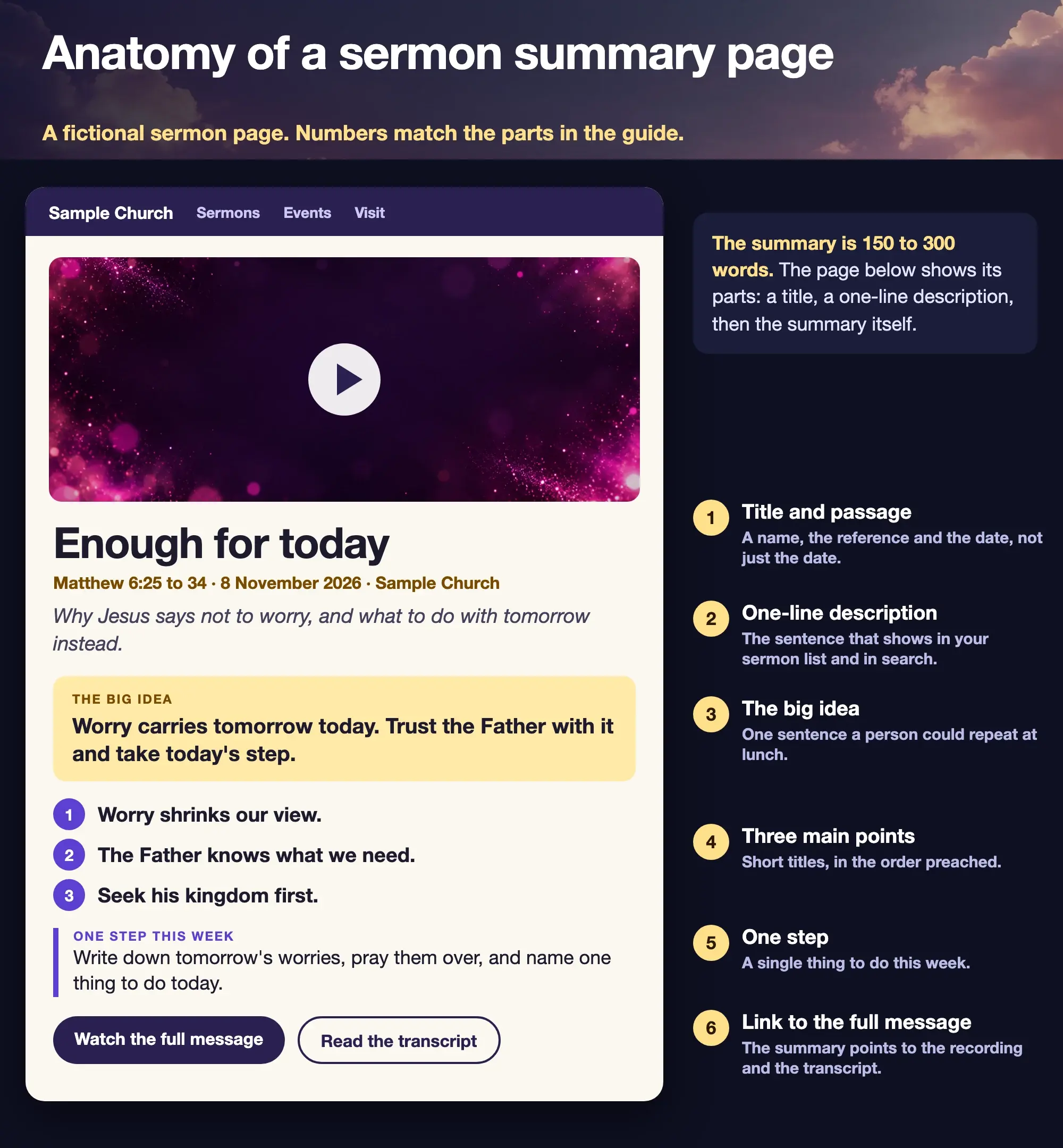
Fictional example from a sample church. The sermon, date and page are placeholders.
What should a sermon summary include?
Six things, in this order. The order follows how a visitor decides: what is it, what is it about, is it for me, what do I do with it.
- Title and passage. A name, the Scripture reference and the date. ReachRight's guide to the perfect church sermons page, last updated 2 October 2026 and read on 16 October 2026, says to give every sermon a date and a descriptive name, not just a date.
- A one-line description. The same guide recommends one or two short sentences to sum up the sermon's purpose, and notes that search engines index them and they help on-site search. This is the line that appears in your sermon list.
- The big idea. One sentence a listener could repeat at lunch.
- The main points. Three or four, each as a short title in the order they were preached, with a line of explanation if you have room.
- One step. A single thing to do this week. Skip it if the sermon did not call for one.
- A link to the full message. The same page should send people to the recording and, if you have one, the transcript. The ReachRight guide suggests offering a transcript as an option for people who want to use it in their own Bible study.
The first two items are metadata for the archive list. Items three to five are the summary itself.
How long should a sermon summary be?
Between 150 and 300 words. This is our suggestion, not a standard: the sources we read do not set a word count. It is long enough to carry a big idea, three points and a step, and short enough to read in a minute on a phone. A summary under 100 words is usually a description, which is fine for the archive list but thin for a page. A summary over 400 starts to repeat the sermon, which is what the recording is for.
The one-line description is separate. Keep it to one or two sentences.
What does a good sermon summary look like?
Here is a worked example, written for a fictional sermon on Matthew 6:25 to 34 at a sample church. It is original wording, and it names the passage by reference rather than quoting it. It runs to 167 words.
Jesus tells a crowd not to be anxious about food, clothing or tomorrow. He points to the birds and the wildflowers, not to say that planning is wrong, but to show that the Father who feeds and clothes them knows what we need. Worry, he says, cannot add a single hour to a life.
The big idea: worry carries tomorrow today. Trust the Father with it and take today's step.
The message makes three points.
- Worry shrinks our view. It makes tomorrow's problem the only thing in the room.
- The Father knows what we need. Jesus does not ask us to pretend we have no needs. He says the Father already knows them.
- Seek his kingdom first. The answer to worry is not a mood but a priority, followed by the next small step.
One step this week: write down tomorrow's worries, pray them over, and name one thing to do today.
Watch the full message or read the transcript for the whole sermon.
The page around it carries the title, "Enough for today", the line "Matthew 6:25 to 34, 8 November 2026, Sample Church" and the one-line description, "Why Jesus says not to worry, and what to do with tomorrow instead." The three point titles in the figure, the step and the two buttons are the same words you have just read.
Three habits make an example like this work.
- Lead with what Jesus or the text says, not what the preacher felt. The first paragraph reports the passage. The points come after.
- Keep the preacher's words where it matters. If a line is a quotation, mark it as one. The exact-quote-or-paraphrase rule explains when to quote and when to paraphrase.
- Do not add what was not said. A summary that brings in a verse or a claim the sermon never made is not a summary.
How do you write one from a recording?
Work from the words, not from memory. Four steps are enough.
- Get the text. Use a transcript, or listen again with the timestamps. If you only remember the sermon, you will summarise what you thought, which is not always what was said.
- Find the big idea. Look for the sentence the pastor returns to or builds to, usually near the start and again near the end. Write it in your own words, in one sentence.
- List the points in order. Give each a short title. If the sermon had a fourth point that was really an illustration, leave it out.
- Check against the recording. Ask the preacher, or someone who was there, to read the summary and say whether it is fair. The repurposing guide covers how to keep a short version true to the longer one.
How can Sermon Uploads help with the draft?
Sermon Uploads can write the first draft. You upload the sermon video, mark where the sermon starts and ends, and it typically returns a short summary, the big idea, the main points and keywords in about 15 minutes, written from the transcript. That is a draft: read it against what was preached and change it before you use it. Copy the text into your own website editor, bulletin or email. Sermon Uploads does not publish anything to your website. The Sermon Uploads summary page shows what the output looks like, and the Sermon Uploads home page covers the rest of what a video makes.
Start with one sermon
Prepare clips and post text for your church to review.
Your first Sermon Uploads video is free with a free account, no card needed. Plans start at US$29.95 a month.
Where should you publish the summary?
On the sermon's own page first, then reuse it. Each place needs a slightly different cut.
- Your sermon page. The full summary, with the recording and, if you have one, the transcript.
- The sermon list. The one-line description.
- The bulletin. The big idea and the one step, a few lines for the next Sunday.
- The recap email. The big idea, the three points and a link. The church email newsletter page shows sample recap emails and a weekly rhythm.
- A social caption. The big idea alone, plus a link. The post review checklist lists what to check before a sermon post goes out.
ReachRight's guide also advises linking to a video hosted on YouTube rather than uploading large files to your own site, to keep the page quick. If your page holds only a player, the summary is the text that gives visitors and search engines something to read.
Before the summary goes live
- Is it between 150 and 300 words?
- Does the title carry the passage and the date?
- Is the big idea one sentence?
- Do the points match the order in the recording?
- Did someone who heard the sermon read it?
- Is every quoted line marked and exactly as spoken?
- Does it link to the full message?
- Is the one-line description written for the sermon list?