Captions, stories, and calls to action
Christmas Eve service invite ideas: copy for six channels and a countdown to Thursday 24 December 2026
Copy-ready Christmas Eve invitation wording for a feed post, Story, flyer, bulletin, email and text message, a dated countdown to Thursday 24 December 2026, and accessibility checks.
A good Christmas Eve invitation gives four facts and one welcome: the day, every service time, the address and who is welcome, plus a line that tells a first-time guest they belong. Put the same four facts on every channel, change the tone to fit it, and start about ten days out online and earlier in print.
Christmas Eve 2026 is Thursday 24 December. This guide gives you wording for six channels, a countdown from that date, and a short accessibility check. It was last checked on 16 October 2026.
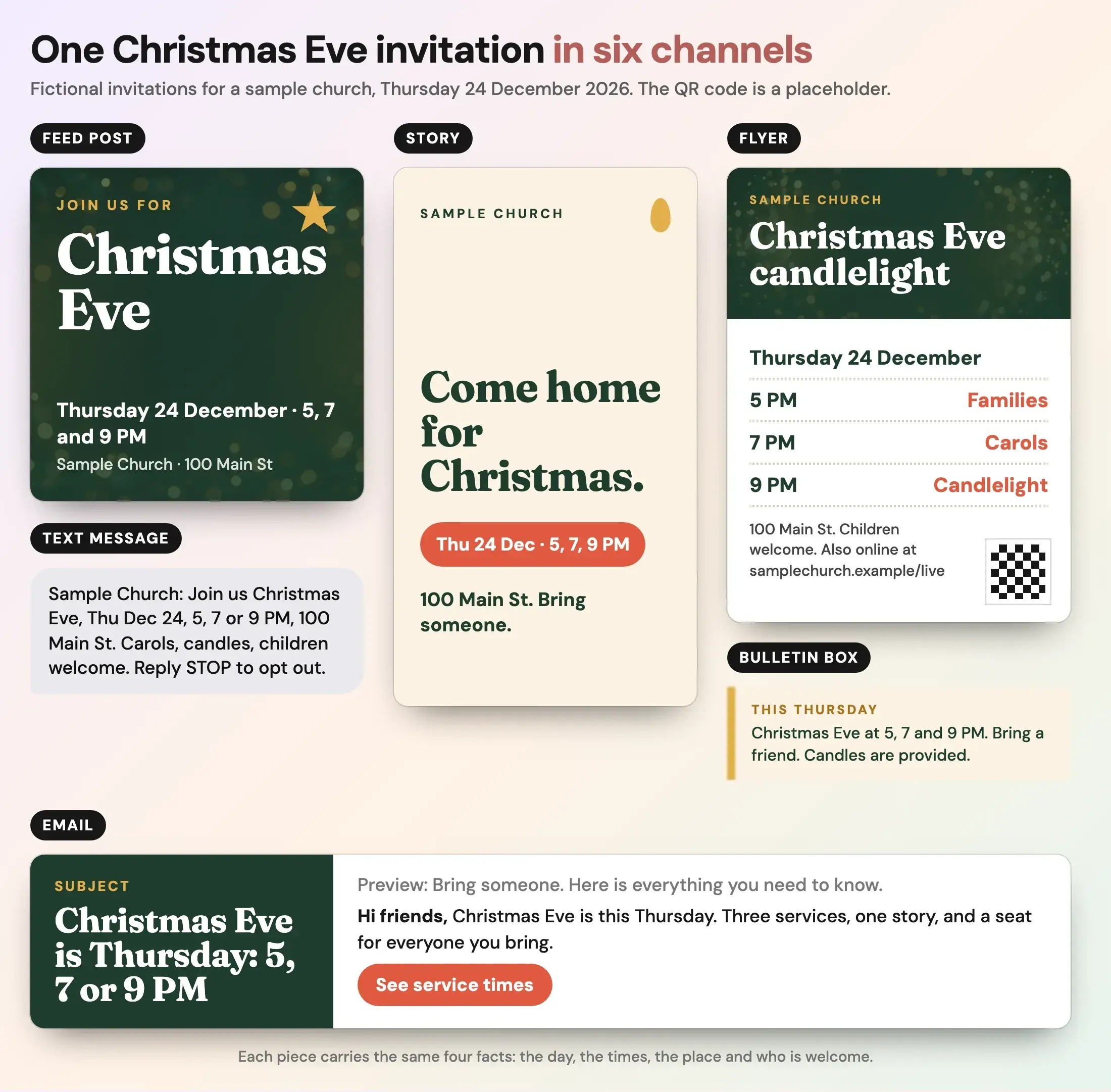
Fictional example from a sample church. The address, URL and QR code are placeholders.
Why does a Christmas Eve invitation matter?
Because many people who are not regular attenders are open to going if someone asks. A 2024 Lifeway Research survey, as reported by Religion Unplugged and read on 16 October 2026, found 47% of Americans say they typically attend church at Christmastime, and 56% say they would likely attend if someone they know invited them. The article does not give the sample size. Earlier Lifeway work, published on its research site from a 2008 study, found 67% of Americans said a personal invitation from a churchgoing family member would be the most effective way to invite them.
The practical point: your graphics and posts work best when members forward them. Write each piece so a member can send it to a friend without editing.
What should every Christmas Eve invitation say?
Four facts, in this order of importance.
- The day, with the weekday. Thursday 24 December.
- Every service time, with AM or PM. 5, 7 and 9 PM. Say what differs, such as a family service.
- The address. A street address that maps, and parking if it is hard to find.
- Who is welcome. Children, newcomers, people who have not been to church in years.
Add the livestream link if you have one, and one line on what to expect. Our church Christmas graphics page has real Christmas templates and sizes. This guide is about the words and the schedule.
What do you write for each channel?
These are original examples for a sample church with services at 5, 7 and 9 PM. Replace the times and address with your own.
Feed post (Square, 1080 × 1080) On the image: Join us for Christmas Eve. Thursday 24 December · 5, 7 and 9 PM. Sample Church, 100 Main St. Caption: Christmas Eve is Thursday. We would love to see you and anyone you bring. Services are at 5, 7 and 9 PM at 100 Main St. Carols, candles and the whole Christmas story. Children are welcome.
Story (1080 × 1920) On the image: Come home for Christmas. Thu 24 Dec · 5, 7, 9 PM. 100 Main St. Bring someone. Keep the words away from the top and bottom, where the app puts its own buttons.
Flyer (Letter or half-letter) Headline: Christmas Eve candlelight. Lines: Thursday 24 December. 5 PM families. 7 PM carols. 9 PM candlelight. 100 Main St. Children welcome. Also online. Add a QR code to the times page and print the short address beside it.
Bulletin box This Thursday: Christmas Eve at 5, 7 and 9 PM. Bring a friend. Candles are provided. Put it on the cover or the top of the inside right panel. Our bulletin templates page shows where it fits on the folded panels.
Email Subject: Christmas Eve is Thursday: 5, 7 or 9 PM Preview text: Bring someone. Here is everything you need to know. Body: Hi friends, Christmas Eve is this Thursday. Three services, one story, and a seat for everyone you bring. Then the times, the address and one button: See service times.
Text message Sample Church: Join us Christmas Eve, Thu Dec 24, 5, 7 or 9 PM, 100 Main St. Carols, candles, children welcome. Reply STOP to opt out. Only text people who agreed to receive texts from the church, and check your text provider's rules on opt-out wording.
What is the countdown to Christmas Eve 2026?
Count back from Thursday 24 December. The online dates match the Christmas graphics page plan, which has the invitation going out Monday 14 December. The earlier print dates are our suggestions for a small team.
| Date | Days out | What to do |
|---|---|---|
| Thursday 12 November | 6 weeks | Fix the service times, address, parking and livestream. Write the copy. |
| Thursday 26 November | 4 weeks | Order printed cards and flyers. US Thanksgiving falls on this day. |
| Sunday 29 November | 25 days | Advent begins. Announce Christmas Eve from the front and in the bulletin. Give out invite cards. |
| Sunday 6 December | 18 days | Ask the church to invite one person. Put the bulletin box in. |
| Monday 14 December | 10 days | Feed post, Story and the first email. |
| Sunday 20 December | 4 days | Bulletin cover with all three times. |
| Monday 21 December | 3 days | Story reminder. Text, for people who agreed to texts. |
| Wednesday 23 December | 1 day | Last push on every channel. |
| Thursday 24 December | Today | Morning post with the times, the Story and the livestream link. |
Outreach's Christmas timeline, read on 16 October 2026, advises ordering invite cards by Thanksgiving and giving them out during the first two weeks of December. Reachright's Christmas Eve guide, read the same day, suggests countdown posts such as "only ten days away" and a heavier push on the 23rd. Neither gives a research basis for the exact days, so treat the dates as a starting rhythm.
If you print flyers or a program, check the size before you send them to the printer.
Flyer print size calculator
Pick a paper size to see its bleed, safe area and the pixels to export for print.
Trim size
8.5 × 11 in
Size with bleed
8.75 × 11.25 in
Pixels to export at 300 DPI (with bleed)
2625 × 3375 px
Safe-area inset
0.25 in
Aspect ratio
1 : 1.29
Trim in millimetres: 215.9 × 279.4 mm. Without bleed: 2550 × 3300 px. With bleed: 2625 × 3375 px.
In Design, keep the default 2x scale for JPG or PNG. Design stores print pages at 150 units per inch, so 2x is 300 DPI.
Worship
under the
stars
Live music, free food and a night to meet your neighbours.
Your address
Sample flyer for a fictional church
- Bleed: art runs out here, then gets cut off
- Trim line: where it is cut
- Safe area: keep text inside, 0.25 in from trim
A guide, not a printer spec. Bleed of 0.125 in and a 0.25 in safe area are the values Design uses. Printers such as 4over4 ask for text at least 0.125 in inside the trim, and some ask for 3 mm of bleed. Check your printer's own template before you order. Pixels are size in inches times DPI, rounded.
Open the flyer print size calculator on its own page.
How do you make Christmas Eve invitations accessible?
Most of these checks take a minute each.
- Put the facts in the caption too. Do not leave the times only inside the image. The W3C's guide to informative images says the text alternative should convey the meaning or content that is displayed visually.
- Write alt text. For the post: Evergreen Christmas Eve invitation with a gold star. Thursday 24 December, services at 5, 7 and 9 PM at Sample Church, 100 Main St.
- Check contrast. Gold text on dark green reads well. Gold on cream does not. WCAG 2.2 asks for at least 4.5:1 for ordinary text (W3C).
- Keep type large. Dates and times are the biggest words after the headline.
- Say what you offer. Step-free entrances, a quiet room, large-print programs or a signed service, if you have them. Add one line only for services you really provide.
- Caption any video. If you post a clip, add captions. See accessible church graphics.
How do you make the set quickly?
Design once, then resize. Make the Square first, then copy it to a Story and a half-letter size, and check each copy. You can do this in any design tool. Design by Church Media Kit has Christmas and Advent templates, a Brand Kit for your church's colors and fonts, and print sizes. It does not post or schedule for you. Download each file and share it yourself. For social wording ideas across the season, see the Instagram and Facebook guides, and plan the week after with what to post after Sunday.
Start with one sermon
Prepare clips and post text for your church to review.
Open Design by Church Media Kit with a free account, no card needed, and start from a Christmas Eve template. Plans start at US$29.95 a month.
Before the invitation goes out
- Does it say Thursday 24 December, with the right year's weekday?
- Are all service times there, with AM or PM?
- Does the address map, and is the livestream link correct?
- Does it say children are welcome, if they are?
- Do the Square, Story, flyer, bulletin, email and text all say the same thing?
- Does the alt text carry the times?
- Did someone who is not on staff read it?