Design, branding, and accessibility
Church livestream graphics checklist: the overlays and slates a service stream needs
The seven graphics a church livestream needs, from countdown to end slate, with sizes, a safe area, what each should say, a run order for Sunday and a pre-service test.
A church livestream needs seven graphics: a countdown, a welcome slide, speaker and Scripture lower thirds, a giving slate, a next-steps slate and an end slate. Make them all 16:9 at 1920 × 1080, keep every word about 5% in from the edge, and put one idea on each. Then run them in the same order every Sunday so the person on the switcher is never guessing.
This guide lists each graphic with what it says and when it shows, then gives the sizes, a safe area, a Sunday run order and a test to do before the first stream. The example is a fictional church. Where a number is a rule of thumb or our own suggestion, it says so. It was last checked on 16 October 2026.
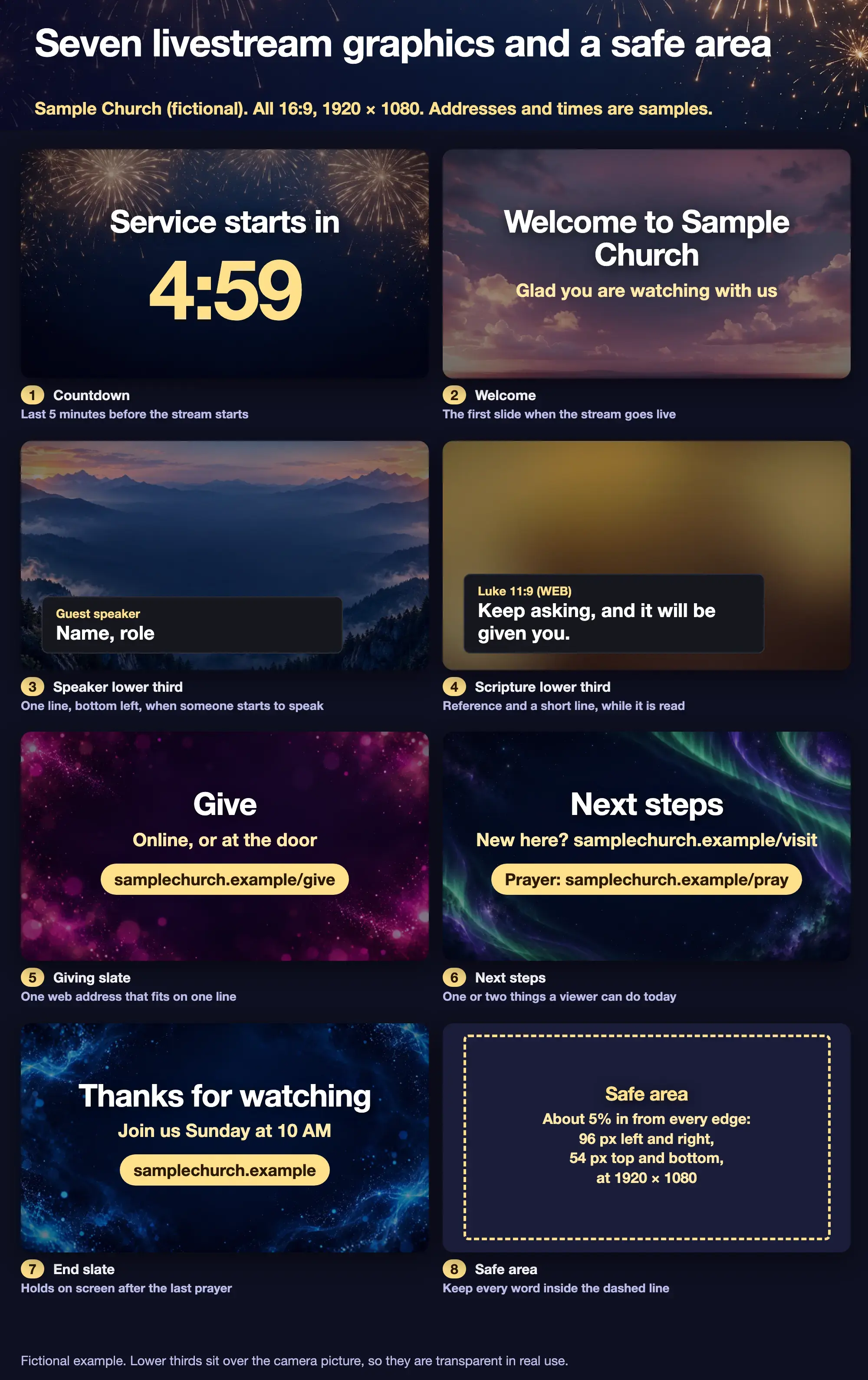
Fictional example from a sample church. The times and web addresses are placeholders.
What graphics does a church livestream need?
Seven, and each has one job. The list below is our checklist, built from how a service stream runs from before the start to after the last prayer.
| # | Graphic | Shows | What it says |
|---|---|---|---|
| 1 | Countdown | The last five minutes before the stream starts | The time left, in the biggest type of any graphic |
| 2 | Welcome | When the stream goes live | The church name and one warm line |
| 3 | Speaker lower third | When someone starts to speak | Name and role, one line |
| 4 | Scripture lower third | While a passage is read | The reference and a short line |
| 5 | Giving slate | Near the offering | One web address |
| 6 | Next steps | After the message | One or two things a viewer can do today |
| 7 | End slate | After the last prayer | Thanks, the next service time and one web address |
Other church-media sources list a similar set. Church Motion Graphics' Christmas media checklist, dated 28 September 2022 and read on 16 October 2026, names slide graphics designed for live stream video, to use at the start of streamed services and at the end to move people to act, plus a "ways to give" lower third. BoxCast's guide on why churches want lower thirds, dated 31 March 2020, lists guest-speaker names, Scripture readings and announcements as uses. Neither lists a safe area or a run order, which is why this guide adds them.
What size should livestream graphics be?
Make them 16:9 and start at 1920 × 1080, which has the same shape as a 1280 × 720 or 3840 × 2160 stream, so your software can scale it. Check the result at your output size, because scaling up can soften the edges, and the church lower thirds page draws each frame to scale.
Slates like the countdown, welcome, giving, next steps and end slides are full frames. Lower thirds are different: they are transparent PNGs that sit over the camera picture, so only the strip shows.
What is the safe area for livestream graphics?
Keep text about 5% in from every edge. At 1920 × 1080 that is 96 pixels from the left and right and 54 pixels from the top and bottom. Broadcasters use the same margin: the European Broadcasting Union's recommendation R 095 defines a 5% graphics-safe area per edge for 16:9 pictures. It was written for television, so treat it as a sensible rule for a stream rather than a streaming standard.
Phones and players also add their own controls over the picture. Keep the strip off the very bottom, and look at the stream on a phone before Sunday.
What should each graphic say?
Short words, one idea. These examples are ours, written for a sample church.
- Countdown: Service starts in 4:59. Start it about five minutes before the stream. Make the minutes huge.
- Welcome: Welcome to Sample Church. Glad you are watching with us. Two short lines. Skip the announcement list.
- Speaker lower third: Guest speaker, Name, role. BoxCast's guide notes that churches usually name guests, such as readers and soloists, and not a lead pastor viewers already know. Do the same.
- Scripture lower third: Luke 11:9 (WEB), Keep asking, and it will be given you. The reference first, then one short line. A longer passage goes in a second strip.
- Giving slate: Give. Online, or at the door. samplechurch.example/give. One address that fits on one line. Show it near the offering and again at the end.
- Next steps: New here? samplechurch.example/visit. Prayer: samplechurch.example/pray. Limit it to two. A visitor who sees five will do none.
- End slate: Thanks for watching. Join us Sunday at 10 AM. samplechurch.example. Hold it for 30 seconds or more after the last prayer, so people who stay can read it. That 30 seconds is our suggestion.
Online viewers cannot see your bulletin or the room's screens, so put the day, time and address on the picture. The accessibility guide to type and contrast applies here as well: light text on a dark strip, large type and no text over a busy part of the photo. BoxCast's guide gives the same advice for lower thirds, to put text on a coloured backdrop so it stands out.
What order do the graphics run on Sunday?
The same order every week. This one is our suggestion, matching the figure.
- Five minutes before: the countdown (1).
- Stream goes live: the welcome (2), for about 15 seconds.
- When the speaker starts: the speaker lower third (3), for about 5 seconds.
- When Scripture is read: the Scripture lower third (4), for the reading.
- Near the offering: the giving slate (5), or a giving lower third over the camera.
- After the message: the next-steps slate (6).
- After the last prayer: the end slate (7), for 30 seconds or more.
The on-screen times are ours; test them with a person who has not seen the graphics, and lengthen any slate a stranger cannot read aloud in time. If the stream is run by a volunteer, a one-page run sheet beside the switcher is worth more than a perfect graphic. A simple content handoff shows how to give a volunteer a short checklist, and a minimum brand guide keeps the graphics looking like one church.
The lower thirds guide covers the Scripture and sermon-point strips in detail.
How do you make and test them?
Make them in any design tool at 1920 × 1080, export slates as PNG or JPG and lower thirds as transparent PNG, and load them into your streaming software as image layers. Many streaming apps can show a PNG above the camera, and yours may differ, so check it. Then do a full run before Sunday: go live to a private or unlisted test, advance each graphic in order and look at the result on a phone and on a laptop.
Church Media Kit can make part of the set. Design has Church Screens templates at 16:9 and 1920 × 1080, so you can build the welcome, giving, next-steps and end slates there and download them as images. Sermon Slides downloads a transparent lower-third PNG at 1920 × 1080 for each slide of a sermon deck, which covers Scripture and sermon-point strips. It does not make the countdown, run your stream or switch graphics for you, and it does not connect to your streaming software. The first Sermon Slides deck is free.
Start with one sermon
Prepare clips and post text for your church to review.
Open Sermon Slides with a free account, no card needed. Your first deck is free. Plans start at US$29.95 a month.
Before the first stream
- Are all seven graphics 16:9 at 1920 × 1080, and are the lower thirds transparent?
- Is every word inside the dashed safe area?
- Does each graphic say one thing?
- Can a stranger read each one aloud before it changes?
- Is the giving address short enough for one line?
- Is the order written on a run sheet beside the switcher?
- Have you looked at a test stream on a phone?