Design, branding, and accessibility
Church announcement slides: what to show on the screens before service
What goes in a pre-service slide loop, how many slides to use, how many seconds each should stay, when to start the countdown, and how to write the welcome and next-step slides.
Before the service, show a short loop of about six to eight slides: a welcome, one slide for people who are new, two or three events, one way to give or serve, one way to stay connected, and then a countdown for the last few minutes. Keep each slide to one idea and about 20 words, and leave each on screen for about nine seconds.
This guide gives the slide order, the timing, a worked example of seven slides and a countdown, and a note on who runs the screen. Where a number is a rule of thumb or our own suggestion, it says so. It was last checked on 16 October 2026.
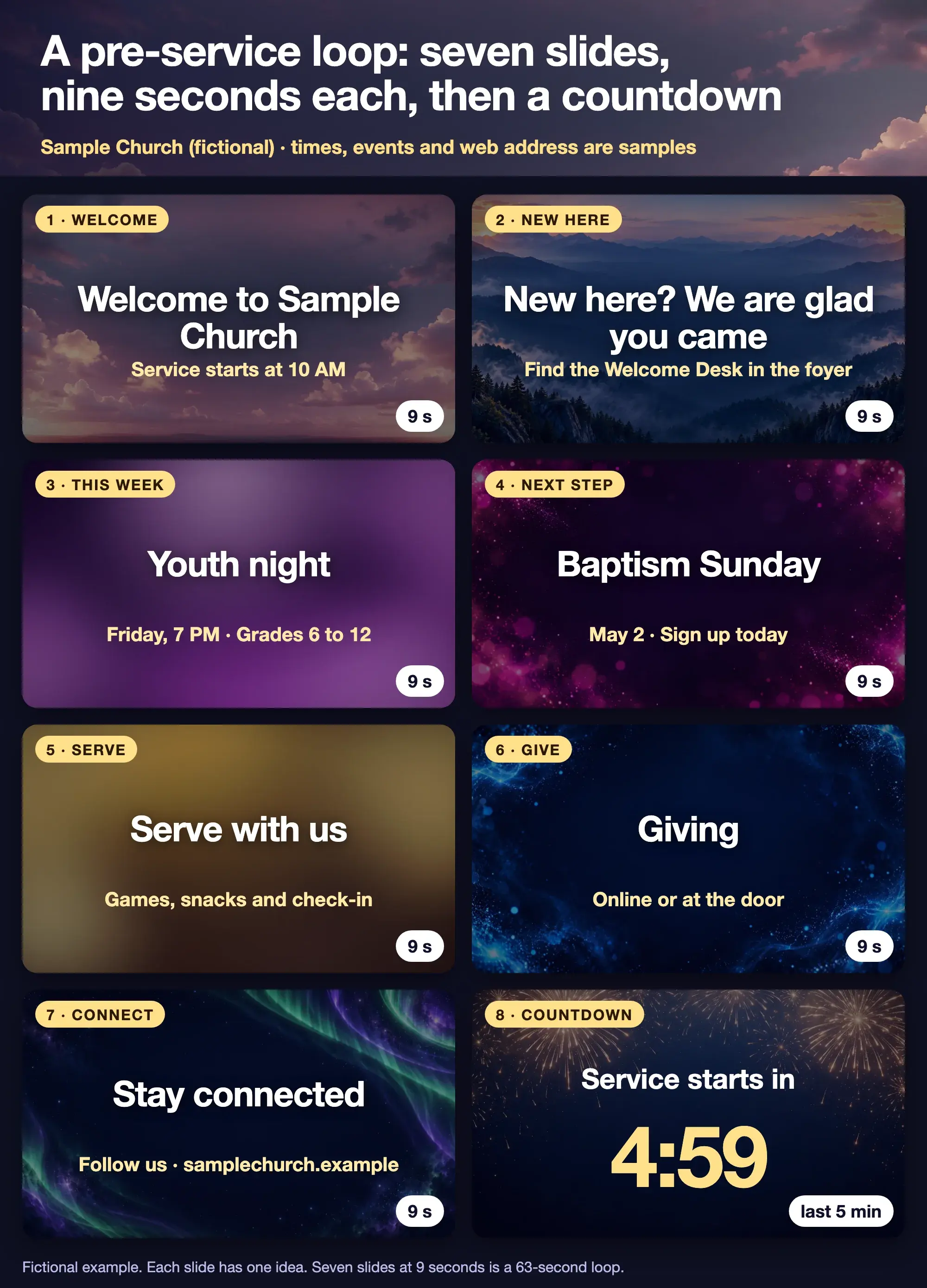
Fictional example from a sample church. The times, events and web address are placeholders.
What should church announcement slides include?
Start with the person who has never been in your building, because they have the most questions and the least patience. A Logos guide, 5 Things Every Church Presentation Needs to Do, dated 14 November 2019 and read on 16 October 2026, says the screen can act as a guide for newcomers. It suggests answering their likely questions, such as where the restrooms are and whether there is children's programming, and telling visitors what you would like them to do next. It notes that most are not ready to join a group or volunteer yet, so the next step should be small. It also suggests highlighting events that suit newcomers and recurring activities, and pairing announcement slides with a personal invitation from the stage.
That points to a simple order, which the figure shows:
- Welcome. The church name and the service time.
- New here. Where to go and who will help.
- This week. One or two events in the next two weeks, with a day and time.
- Next step. One thing a guest can do, such as sign up for a class or join a lunch.
- Serve. One way to help.
- Give. How to give, in a few words.
- Connect. One web address or social handle.
- Countdown. A clock for the last few minutes.
Here is the wording on each slide in the example. It is ours, written for a sample church.
| Slide | On screen | Seconds |
|---|---|---|
| 1. Welcome | Welcome to Sample Church. Service starts at 10 AM. | 9 |
| 2. New here | New here? We are glad you came. Find the Welcome Desk in the foyer. | 9 |
| 3. This week | Youth night. Friday, 7 PM. Grades 6 to 12. | 9 |
| 4. Next step | Baptism Sunday. May 2. Sign up today. | 9 |
| 5. Serve | Serve with us. Games, snacks and check-in. | 9 |
| 6. Give | Giving. Online or at the door. | 9 |
| 7. Connect | Stay connected. Follow us · samplechurch.example. | 9 |
| 8. Countdown | Service starts in 4:59. | Last 5 minutes |
Church Media Kit's church slides page covers slide size, font size and slide count for sermon slides. This guide covers the loop before the sermon.
How many announcement slides should you show?
About six to eight, with a minimum of four. This is our suggestion, not a standard. A loop is something people glance at while they find a seat, so a long one repeats details no one reads. If an event needs a paragraph, it belongs in the bulletin or on your website.
Count your slides against your calendar. If you have more than three events in the next two weeks, show the ones that matter to most of the room and put the rest in an email or on the website. The same cuts apply as in print: drop old news, insider words and anything without a day, time and place.
How many seconds should each slide stay on screen?
About nine seconds for a slide of about 20 words, and longer if it has a web address or a QR code. The numbers we found are ranges, not rules. In Proclaim, a presentation program, the pre-service loop advances every five seconds by default and loops until you move to the next segment, according to a Logos guide dated 23 October 2013 that we read on 16 October 2026. The version of the software has probably changed since then. A university accessibility page, from the University of Northern Iowa and read on the same day, advises allowing at least 5 to 7 seconds per slide, with more time for longer text, and not advancing too quickly. Neither is written for a church room.
Our working rule is to start at nine seconds for a 20-word slide and add a few seconds for a QR code or a web address that people will type. Then test: ask someone who has not seen the slides to read them aloud at the pace you have set.
The arithmetic is simple. Seven slides at nine seconds is a 63-second loop. If it starts 15 minutes before the service, it runs about 14 times, so the most important slide should not be the only one with a date.
How long should the loop run before service?
Start it about 20 minutes before the service begins and leave it running until the countdown. WorshipHouse Media's guide on events and announcements, dated 23 October 2012 and read on 16 October 2026, says its author usually starts a loop about 20 minutes before the service and keeps it running afterward for people who stay. It also suggests showing the same slide behind someone speaking about an event during the service, with the advice "Don't just tell, show." That is an older, vendor-run source, so adjust the timing to how your people arrive.
For a late-arriving crowd, a loop that has been running since 20 minutes before looks the same at minute 15 as at minute 1. Add the countdown for the last five minutes so the room knows the time is near.
What goes on the welcome, new here and next-step slides?
Keep these three short and kind. The wording below is ours.
- Welcome: Welcome to Sample Church. Service starts at 10 AM. Nine words. Add the series title if you have one.
- New here: New here? We are glad you came. Find the Welcome Desk in the foyer. Say where, not just who.
- Next step: Baptism Sunday. May 2. Sign up today. One slide, one step. Do not put three asks on it.
The Logos guide suggests the welcome slide should reflect the character of your church, whether that is a still with the church's name, a light motion graphic or a short staff video. Whichever you choose, check that the type stays readable on the screen your room has.
What should the announcement slides look like?
One idea, large type, calm background. The rules in the sermon slide design rules apply: light text on a dark, plain area, with a darker overlay behind words on a busy photo. The same simple rule helps your announcements and your sermon slides look like one church.
Check how many words are on each slide. About 20 is a good limit, and the checker below rates a slide and can split a long one into two.
Slide word count checker
Paste the words for one slide and see whether it is short enough to read from the back row.
Too much for one slide. Shorten it or use Split for me.
Words
73
Characters
378
Lines
1
Sub-points
0

God told Abram to leave his country, his family and everything familiar, and to go to a land he had not yet seen. He did not receive a map, a timeline or a guarantee. He received a promise. Abram packed up his household, said goodbye to the only home he had known and took the first step. Faith often looks like walking before the path is clear, trusting the One who called you.
Preview on a worship background. The text shrinks to fit, so a crowded slide gets small.
Rules of thumb, not a standard. Logos advises 140 characters or less and no more than four sub-points on a slide, which is roughly 20 words. Readable is up to 20 words and 140 characters. Tight is up to 30 words or 210 characters, our own allowance. Anything longer, or more than four bullet lines, is too much.
Open the slide word count checker on its own page. For the bulletin that matches the loop, see what to put in a church bulletin.
The slides in the figure run from 5 words (Stay connected, Follow us, plus the web address) to 14 (the New here slide). Where you have a long address, shorten it or put it on one slide with nothing else.
When do you switch to the countdown?
About five minutes before the service. This is our suggestion: it is long enough for the room to take the hint and short enough that the countdown does not feel like a wait. The countdown should show the minutes clearly, in the biggest type of any slide. Some presentation software can switch from the loop to the countdown on a timer, so check yours. If it cannot, the person running the screen switches by hand.
When the countdown ends, go to the first slide of the service. Do not leave the room on a clock at 0:00.
Who should run the announcement slides?
One person, with a template and a deadline. A simple handoff keeps the loop current: the person who plans the service sends the events by Wednesday, the person who runs the screen updates the slides by Friday, and someone else reads them before Sunday. A simple content handoff from pastor to volunteer describes how to set that up, and the minimum church brand guide keeps the look consistent from week to week.
How do you make the slides?
In whatever software your church runs the screen from. A presentation app, a worship software or a PowerPoint file all work. Sermon Slides by Church Media Kit makes the sermon deck, not the announcement loop: paste your sermon, edit the slides and download PowerPoint or PDF. If you drop the sermon deck into the same presentation as your announcements, keep the same background and fonts so the two sets match. You can present the deck from Studio or download it.
Start with one sermon
Prepare clips and post text for your church to review.
Open Sermon Slides with a free account, no card needed. Your first deck is free. Plans start at US$29.95 a month.
Before the loop goes on the screen
- Does every slide have one idea and about 20 words or fewer?
- Does every event show a day, a time and a place?
- Is there a slide for someone who is new, and does it say where to go?
- Is there one next step for visitors, not three?
- Is each slide on screen long enough for a stranger to read it aloud?
- Does the countdown start at about five minutes and end on the first slide of the service?
- Has someone read the slides on the room's screen from the back row?