Design, branding, and accessibility
What to put in a church bulletin: sections, order, word counts and what to cut
What goes in a church bulletin, in what order, and about how many words each part needs. Includes what to leave out, a print or digital decision, kids insert ideas and a proofing checklist.
A church bulletin needs four things: the order of service, what is happening this week, one next step for visitors, and a way to reach someone and give. Everything else is optional. If a first-time guest can follow the service and find the door, the address and the next step, the bulletin has done its job.
This guide shows the sections, an order that works for a four-panel folded bulletin, a word budget for each part, what to cut, and how to decide between print and digital. It was last checked on 16 October 2026.
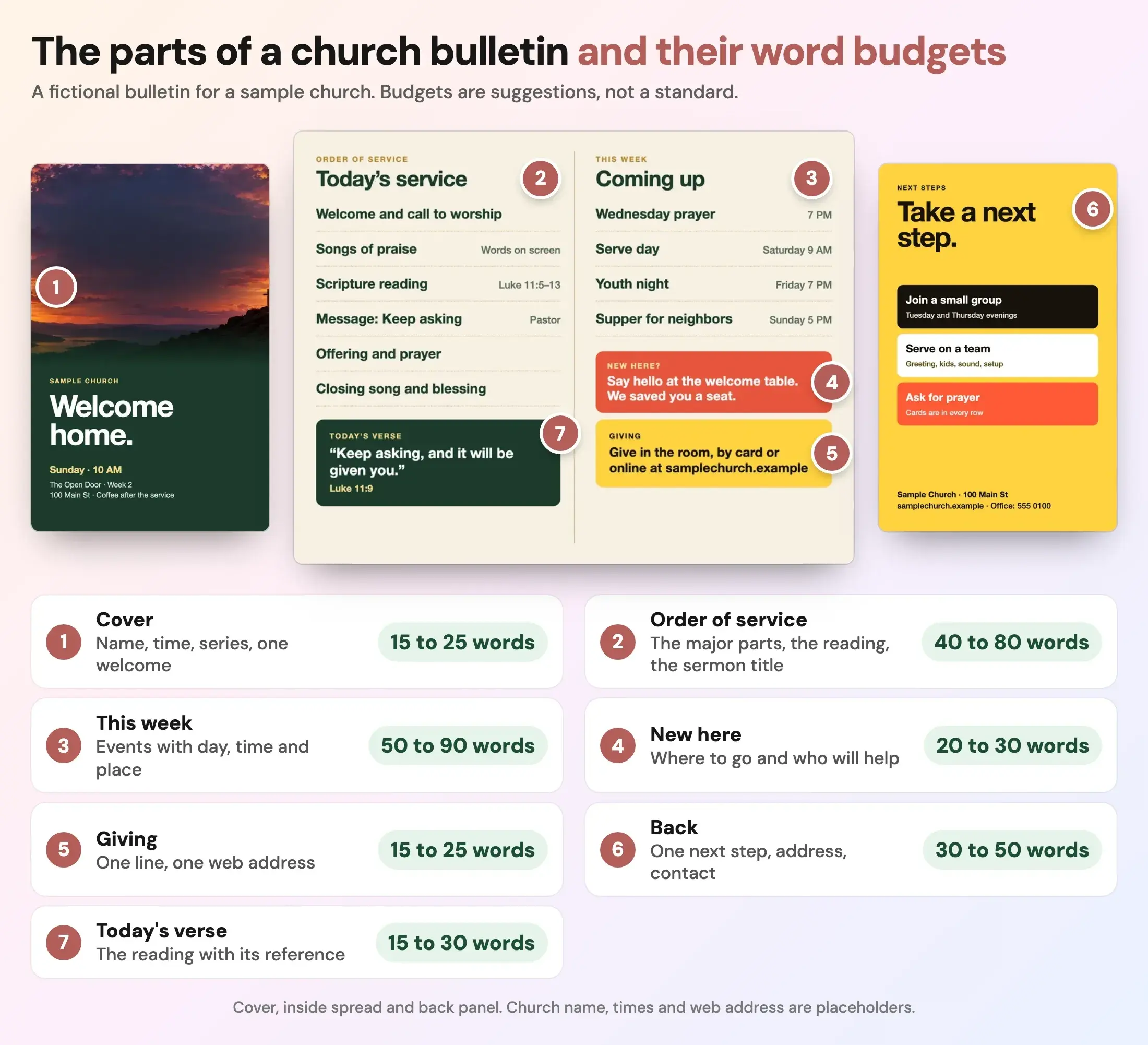
Fictional example from a sample church. The word budgets are our suggestions, not a standard.
What goes in a church bulletin?
Church practice varies by tradition, so treat this as a starting list and keep what your people use. A Reachright guide to church bulletins, read on 16 October 2026, lists eight common elements: the order of service, announcements, Scripture verses, offering notices, prayer requests, news and updates, contact information and artwork. It also says you do not need every element every week.
For a folded bulletin, the Church Media Kit bulletin templates page names the four panels Cover, Inside left, Inside right and Back. Here is what to put on each, with a word budget.
| Part | What goes in it | Words, about |
|---|---|---|
| 1. Cover | Church name, service time, this week's series or season, one welcome line | 15 to 25 |
| 2. Order of service | The major parts of the service, the Scripture reading and the sermon title | 40 to 80 |
| 3. This week | Events in the next two weeks with day, time and place, one sign-up link | 50 to 90 |
| 4. New here | One sentence telling guests where to go and who will help | 20 to 30 |
| 5. Giving | How to give, in one line with one web address | 15 to 25 |
| 6. Back | One next step, the address, the office phone and email | 30 to 50 |
| 7. Today's verse | The reading or memory verse with its reference | 15 to 30 |
Add the printed words of any prayer or song that the whole room says or sings and is not on the screen. Those words come on top of the budget.
In what order should a church bulletin go?
Put the parts in the order a person meets them.
- Cover: the name, the time and one welcome. A guest holding it before the service starts should learn where they are.
- Inside left, the order of service: what happens, in order, so no one feels they are stumbling in the dark. This is the part everyone reads during the opening minutes.
- Inside right, this week: things to do after the service. Put the biggest event first.
- Back, the next step: the address, contact details and a single action for a new family.
Church Marketing Sucks, read on 16 October 2026, makes visitor-focused suggestions along the same lines: preview the sermon on the cover, explain when to sit or stand and how the offering works, and put the address, website and service times on the back.
How many words should a church bulletin have?
No source we found sets a standard, and the Reachright guide gives no word count. Our working suggestion is about 185 to 330 words across four panels, the sum of the budgets above, before any printed congregational text. Less than that looks bare. More than that tends to crowd out the white space that makes a folded page easy to skim.
A quick test: print one copy on your own printer and hold it at arm's length. If you cannot tell where the order of service is, there is too much on the page. The accessible graphics guide covers type size and contrast, which apply to print as well as screens.
What should you leave out of a church bulletin?
Cut these first.
- Announcements most people do not need. Church Marketing Sucks advises limiting announcements to events relevant to most of the congregation and sending the rest to the website or targeted emails.
- Loose inserts every week. The same page warns that frequent inserts lose their impact. Keep inserts for the few things that matter this week.
- Insider words. "Narthex", "fellowship" and committee names mean little to a guest. Say "the foyer" and "free supper".
- Old news. Last month's event with a date in the past tells guests the church is not paying attention.
- Anything with no day, time and place. A line that sends people to the office is a line to fix or cut.
- Decoration. The same source says to avoid crowding the cover with colour and graphics.
- Long thank-you lists. Thank people in the service or in a separate note.
Print, digital or both?
Both, for most churches, with print as the base. A hybrid is the approach the Reachright guide recommends: offer both formats and cross-promote them. It names real digital benefits, such as clickable links, last-minute updates and a smaller footprint. It also says some members prefer something in hand.
| Digital | ||
|---|---|---|
| Best for | Guests, older members, the first five minutes | Links, sign-ups, sermon notes, last-minute changes |
| Weak at | Late changes, long lists | People without a phone or data in the building |
| Keep it short by | Fitting four panels | Linking to one page, not attaching everything |
Two small habits link the two. Put a short web address or a QR code beside any sign-up so print readers can act, and always print the address in words too. If your church posts a digital bulletin as a PDF on the website, make sure the type reads on a phone.
If you print on an office copier, the Church Media Kit Design editor can make a Copier PDF, which puts one folded bulletin on a letter sheet, front and back. Print double-sided at 100% scale and flip on the short edge. To check bleed and the safe area for a print shop, use the calculator.
Flyer print size calculator
Pick a paper size to see its bleed, safe area and the pixels to export for print.
Trim size
8.5 × 11 in
Size with bleed
8.75 × 11.25 in
Pixels to export at 300 DPI (with bleed)
2625 × 3375 px
Safe-area inset
0.25 in
Aspect ratio
1 : 1.29
Trim in millimetres: 215.9 × 279.4 mm. Without bleed: 2550 × 3300 px. With bleed: 2625 × 3375 px.
In Design, keep the default 2x scale for JPG or PNG. Design stores print pages at 150 units per inch, so 2x is 300 DPI.
Worship
under the
stars
Live music, free food and a night to meet your neighbours.
Your address
Sample flyer for a fictional church
- Bleed: art runs out here, then gets cut off
- Trim line: where it is cut
- Safe area: keep text inside, 0.25 in from trim
A guide, not a printer spec. Bleed of 0.125 in and a 0.25 in safe area are the values Design uses. Printers such as 4over4 ask for text at least 0.125 in inside the trim, and some ask for 3 mm of bleed. Check your printer's own template before you order. Pixels are size in inches times DPI, rounded.
Open the flyer print size calculator on its own page.
What goes on a kids bulletin insert?
A kids insert is a half-letter page that a child can use without a parent reading it aloud. The sample on the bulletin templates page has a door to draw, a word list and a memory verse. Ideas that fit on one page:
- A picture to draw or colour that matches the story, such as a door for "keep knocking".
- Five or six words from the passage to find in a small word search.
- The memory verse, in large type, with the reference.
- One question to ask a parent on the way home.
- A short instruction line, such as "Draw what you think is behind the door."
Keep the type large and the instructions to one line. Commercial packs of children's worship bulletins exist, usually as double-sided letter pages for different age bands, but most are sold by vendors, so read the sample pages and the license before you print a whole series from one source.
What changes on special Sundays?
Most special services keep the same four panels. What changes is the cover, the order and one extra element.
- Easter and Christmas Eve: many guests are new, so add a "plan your visit" line and the end time, and explain what happens with candles or communion. See the Christmas graphics page for a service program design.
- Mother's Day and Father's Day: a short line of thanks is enough. Be careful with wording for people for whom the day is hard.
- Baptism Sunday: include a line about what baptism means in your church. Ask each person or a child's parent before you print a name.
- Series launch: put the series title and one line about it on the cover.
Who should own the bulletin?
One person, with a clear deadline. A Thursday copy deadline gives you Friday to proof and the weekend to print. A written handoff helps: who writes, who proofs, who prints. A simple content handoff from pastor to volunteer and the minimum church brand guide cover that kind of routine.
You can build the bulletin in any layout tool. In Design by Church Media Kit you start a Folded bulletin or a Tri-fold, fill each ordered panel and download a print PDF or a Copier PDF. Church Media Kit does not print or post it for you.
Start with one sermon
Prepare clips and post text for your church to review.
Open Design by Church Media Kit with a free account, no card needed, and start a folded bulletin. Plans start at US$29.95 a month.
A Thursday proofing checklist
- Is every date, time and room right, and does each have a weekday?
- Does the order of service match what will actually happen on Sunday?
- Is the sermon title and Scripture reference spelled right?
- Can a first-time guest see the next step and the address without turning the page?
- Is the web address correct, and does the QR code scan from a printed proof?
- Did someone other than the writer read it?
- Is there a test copy from the actual copier?