Planning and sustainable church communication
Church social media content calendar template: plan a month of posts in one sitting
A copy-ready monthly church social media content calendar, the weekly post mix behind it, and a batching routine a volunteer can keep up, with a worked November example.

To plan church social media a month ahead, choose three or four types of post, give each week the same three slots (a sermon post, an event or community post, and an invitation to Sunday), and write all the captions in one sitting. Then fill the slots from what your church already makes: the sermon, the bulletin and the events list.
This guide gives a calendar you can copy, the weekly mix behind it, and a routine for batching the work. The example is a fictional November 2026. Where a number is a rule of thumb or our own suggestion, it says so. It was last checked on 16 October 2026.
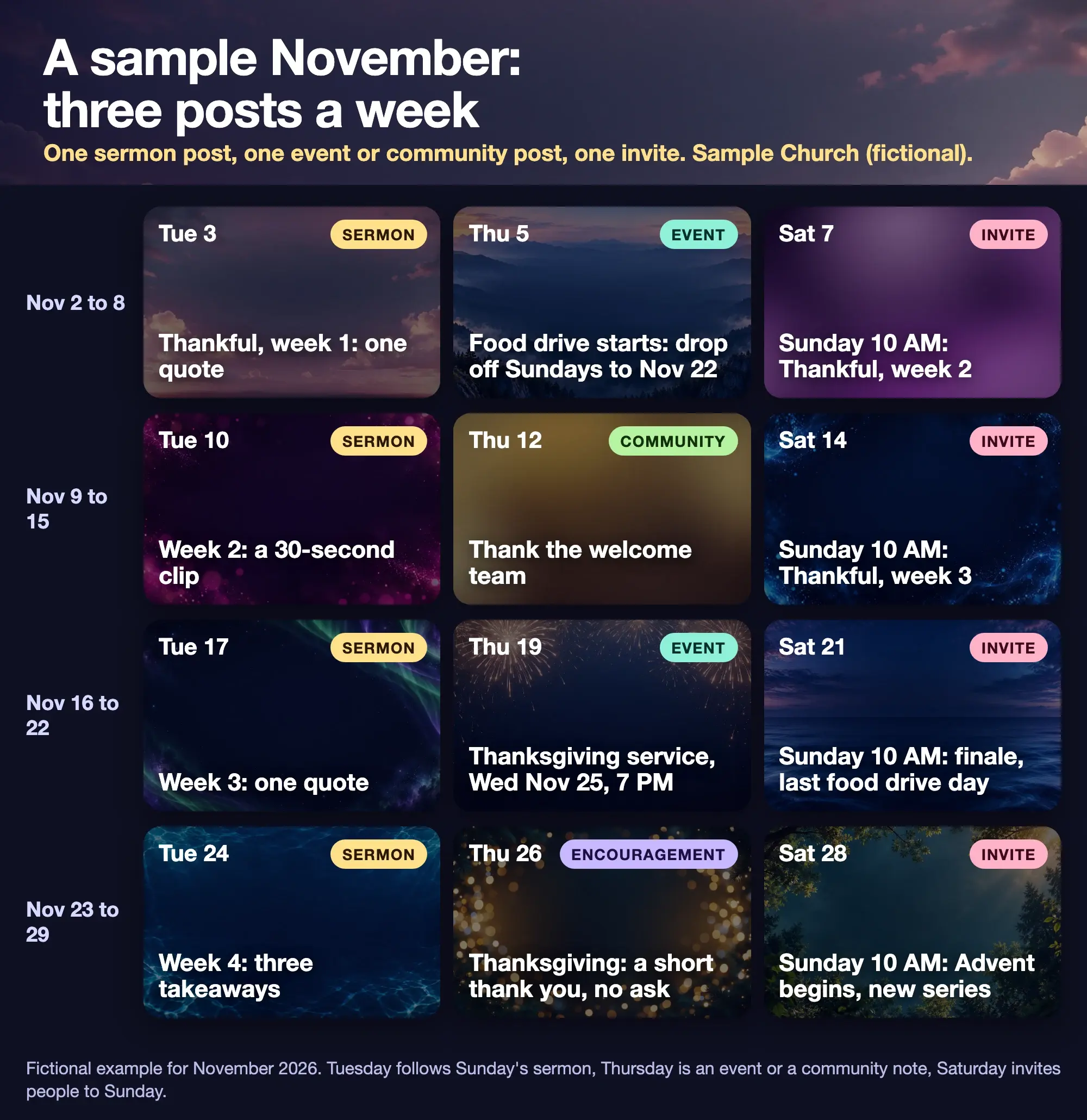
Fictional example from a sample church. The series, events and times are placeholders.
What should a church social media content calendar include?
A date, a type of post, the idea in a few words and a person who owns it. That is all. A calendar that holds more than that tends to go unread.
A church-communications guide from the Christian Reformed Church's Network, written by Kristen Parker and dated 30 March 2026, lays out the same four steps, read on 16 October 2026. Choose three or four content types to rotate. Sketch the month on a calendar. Reuse what you already have, such as sermons, bulletins and Sunday photos. Write the captions in one sitting. Its sample plan has about three posts a week, and it says plainly that you do not need to post every day. It also says a month of content can be made in "a couple of hours."
The four types it names are events and announcements, encouragement or Scripture, community life, and invitations. Our template keeps those and gives the sermon its own slot, because for most churches the sermon is the best source of posts.
What is the weekly post mix?
Three posts, each with one job. This is our suggestion, built on the three-a-week example above.
| Slot | Day | Type | What it does |
|---|---|---|---|
| 1 | Tuesday | Sermon | One quote, a short clip or three takeaways from last Sunday |
| 2 | Thursday | Event or community | The next event, a thank-you or a look at a ministry |
| 3 | Saturday | Invite | Sunday's time, the series and one reason to come |
The days are a choice, not a rule. Tuesday gives the sermon a day to settle and lets someone check a quote against the recording. Saturday is the invitation, so it carries the time and place. Move any slot to a day your volunteer can actually reach.
A vendor guide from SocialKit, dated 3 February 2026, suggests a seven-day mix with service details on Saturday and a "doors are open" reminder on Sunday morning, then a quote on Monday, a clip on Tuesday, a spotlight on Wednesday, an event on Thursday and encouragement on Friday. It is a sales page, so read it as one example. If seven posts a week is more than your team can review, three is enough. How often should a church post on social media? explains how to work out your own number, including the reasons to skip a post.
What does a copy-ready monthly calendar look like?
Copy this table into a spreadsheet or a shared document, then change the dates and ideas. It matches the figure above.
| Week | Tuesday: Sermon | Thursday: Event or community | Saturday: Invite |
|---|---|---|---|
| Nov 2 to 8 | Tue 3: Thankful, week 1, one quote | Thu 5: Food drive starts, drop off Sundays to Nov 22 | Sat 7: Sunday 10 AM, Thankful, week 2 |
| Nov 9 to 15 | Tue 10: Week 2, a 30-second clip | Thu 12: Thank the welcome team | Sat 14: Sunday 10 AM, Thankful, week 3 |
| Nov 16 to 22 | Tue 17: Week 3, one quote | Thu 19: Thanksgiving service, Wednesday Nov 25, 7 PM | Sat 21: Sunday 10 AM, finale, last food drive day |
| Nov 23 to 29 | Tue 24: Week 4, three takeaways | Thu 26: Thanksgiving, a short thank you with no ask | Sat 28: Sunday 10 AM, Advent begins, new series |
Add four columns to your own copy: Owner, Source, Reviewed by and Status. The source column is the one that saves you. A sermon post points to a timestamp in the recording, an event post points to the person who owns the event, and a photo points to the written permission.
Every dated example here is fictional, but the calendar facts are real. Thanksgiving in the United States falls on Thursday 26 November 2026, and the first Sunday of Advent is 29 November. If your church is outside the US, swap in your own dates.
How do you plan a month of church posts in one sitting?
Work from the dates outward. About an hour is a reasonable plan, though that is our estimate.
- Mark the fixed points. Put Sundays, services, the sermon series weeks and every event in the month on the calendar first. Ask each ministry for its dates, and ask for them in writing.
- Fill the Saturday invites. They are the easiest, because the time and place barely change. Only the series line moves.
- Fill the event and community slots. Put the event with the nearest date in the first free Thursday, and give it two posts at most: a first announcement and one reminder. Use the other Thursdays for thank-yous and ministry notes.
- Leave the sermon slots as placeholders. You cannot write them until the sermon has been preached. Note the series and week so the post has a subject.
- Mark the weeks you will skip. A holiday or a staff holiday is a good reason for a quiet week. A planned gap is better than a post that nobody has checked.
If you want more ideas for the Tuesday slot, what to post after Sunday lists posts that follow a service.
How do you batch church social media content?
Split the month into a planning block and a short weekly block. A SocialKit guide puts the weekly batch at 60 to 90 minutes, with about 10 minutes a day for replies and about 20 minutes a month to review. Those figures come from a vendor, not a study, so treat them as a starting point and adjust them to your team.
Here is the routine in one place.
| When | Time (vendor figure) | Job |
|---|---|---|
| Last week of the month | About 1 hour (our estimate) | Plan the next month: fixed dates, Saturday invites, event and community slots |
| Monday | 60 to 90 minutes | Pull the quote or clip from Sunday's sermon, write the week's captions, make the images, schedule or save them |
| Every day | About 10 minutes | Reply to comments and messages |
| End of month | About 20 minutes | Look at what people responded to, then change next month |
A few habits make the Monday block work.
- Write the words before the graphics. A caption is quick to fix. A finished image is not. The weekly workflow from one sermon puts the review between the words and the design for this reason.
- Keep a second person in the loop. Someone other than the writer checks the quote against the recording and the details against the event owner.
- Keep replies out of the batch. Replies are live work. A scheduled calendar cannot answer a question about the Sunday time or a prayer request.
- Keep one sheet. If the plan lives in a message thread, it will be lost by week three.
For the whole year, see the 52-week church media calendar.
What graphics does the calendar need?
Three formats cover it, using the sizes in Design: Square at 1080 × 1080, Portrait at 1080 × 1350 and Story at 1080 × 1920. Make the invitation as a Story and a Square, the sermon quote as a Square or Portrait, and the event as a Square. Keep the same two fonts and one or two colours so the month reads as one set. The church graphics page shows each size drawn to scale, with finished samples.
Church Media Kit can produce part of this. Sermon to Social drafts a week of social graphics and teaching carousels from a public YouTube sermon, and Design is the browser editor where you change the words, add your church's logo, colours and fonts, and download images. Your church posts the images itself. Church Media Kit does not post or schedule for you, so the Monday step of putting posts into a scheduler happens in the tool your church already uses.
Start with one sermon
Prepare clips and post text for your church to review.
Open Design with a free account, no card needed. Plans start at US$29.95 a month.
A last check before the month starts
- Does every week have a sermon slot, an event or community slot and an invite?
- Does every event post show a day, a time and a place, and has the event owner confirmed them?
- Does every post name an owner and a source?
- Has someone other than the writer checked the quotes against the recording?
- Is there written permission for every photo of a person, and none for a child without a parent's yes?
- Are the quiet weeks marked, so a gap looks planned?
- Is there a reply plan, with a named person for comments and messages?