Sermon repurposing and source integrity
How to turn a sermon into a five-slide Instagram teaching carousel
A source-faithful five-slide method for carrying one sermon claim through a question, biblical grounding, practice, and a clear next step.
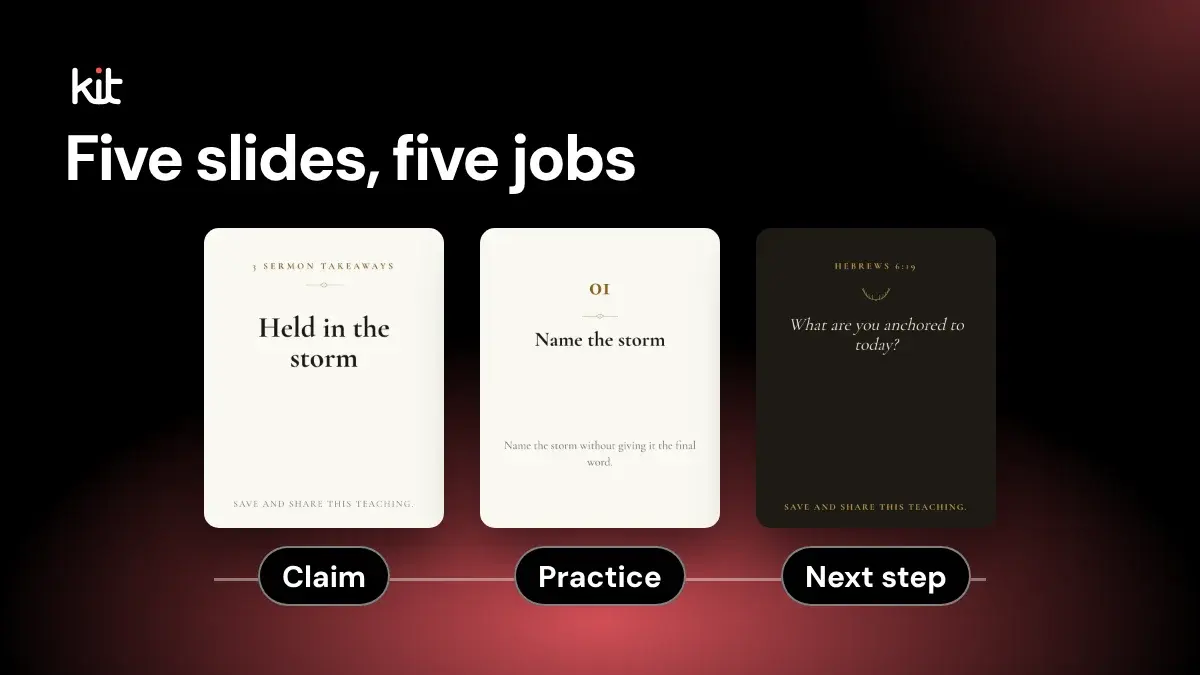
To build a five-slide Instagram teaching carousel, start with one sermon claim. Give each slide one job:
- Recognize the reader's question.
- Name the sermon's claim.
- Show the biblical grounding used in the sermon.
- Give one faithful practice that the sermon supports.
- Leave a source-aware next step.
The slides should read as one argument, not five quotes pulled from different parts of the message.
Before you start. This guide is for church staff and volunteers who post sermon teaching and want it to stay true to the sermon. You will end up with five slides, a caption, and a short record of where each line came from. You need the sermon recording, a transcript of it (the sermon's words written out, such as YouTube's captions), and someone with authority to approve the teaching. Draft everything in a notes app if you like; a design tool is only needed at the end. The source brief and the review take more care than the design, and they are what keep the post faithful.
Not every sermon fits. If the point cannot survive this compression, post a single quote graphic, write a longer recap, or direct people to the full sermon through a route the church controls. You can also use more slides or a larger format. For the complete source-to-export process, see the YouTube sermon workflow; for final wording and design checks, use the sermon post review checklist.
A fictional five-slide example
The following example is entirely fictional. It does not come from a real sermon, preacher, church, or customer. The wording is instructional copy, not a Scripture quotation.
Here is what the five jobs look like in order. Imagine a sermon on James 1:19-20. Its invented central claim is that Christian listening refuses to let anger lead a hard conversation.
- Question. "What should guide us when a hard conversation gets heated?"
- Claim. "Christian listening refuses to let anger lead the conversation."
- Biblical grounding. "In James 1:19-20, the sermon connects careful listening and slow speech with resisting anger's control."
- Faithful practice. "Before you answer, say back what you heard and ask whether you understood."
- Source-aware next step. "Read James 1:19-20, then watch the full sermon for its wider argument."
Opens a free sign-up for Church Media Kit.
The example works because every slide advances one invented claim. It does not prove that this is the only faithful reading of James, and it does not authorize a real church to use the copy without checking its own sermon.
A real reviewer would still ask whether the preacher made that application, whether the paraphrase is fair, whether the passage reference is complete, and whether "anger's control" accurately reflects the sermon. The template supplies order. It does not supply authority.
Is five the best number of Instagram carousel slides?
No universal evidence says five is the best number. Five is an editorial constraint for this method, not an Instagram optimum or an algorithm rule. It is short enough to review as one unit and long enough to keep the question, claim, source, practice, and next step distinct. Platform limits can change, so check Instagram's current official help before export.
Build a source brief before you write a slide
Do not begin in the design tool. Write a source brief first. It should fit on one screen and answer these questions:
- What is the sermon's central claim in one sentence?
- Which passage and source span support that claim?
- Where does the preacher qualify or limit it?
- Which application does the preacher actually make?
- Does the selection include a testimony, prayer request, child, counseling story, or other material that needs permission or should stay private?
- Where can a reader find the passage or full sermon for context?
- Who has authority to approve the final teaching? In a church without a communications team, that is usually the preacher or pastor.
Record timestamps or transcript spans beside every proposed slide. Keep them attached to the draft until approval. A reviewer should not have to search a forty-minute video to discover whether slide four came from the sermon.
Decide whether each line is an exact quotation (the preacher's words, unchanged), a paraphrase (the idea in your words), or original application copy (your own wording for what to do). Use quotation marks only when the words match the recording. Do not clean up grammar, join distant sentences, or replace a word and still call the result exact.
Reuters' published quotation standard warns that selective or altered quotation can misrepresent a speaker. The same integrity problem applies to sermon graphics.
A transcript helps you find the source. It does not settle the wording. YouTube's automatic caption guidance says automatic captions can misrepresent speech because of pronunciation, accents, dialects, or background noise. Check exact words, names, negation, numbers, and Scripture references against the recording.
Slide 1 should recognize the real question
Open with the question or tension the sermon actually addresses. A useful first slide lets the intended reader know, "This teaching speaks to something I am facing." It does not need a shocking claim.
Weak openings promise more than the sermon can deliver:
- "The one habit that will fix every relationship"
- "Five seconds that will remove your anxiety"
- "Read this and your week will change"
Those lines may attract attention, but they add guarantees the sermon probably did not make.
A better opening names the honest question:
- "What should guide us when a hard conversation gets heated?"
- "What does this passage ask us to do with our fear?"
- "Why does the sermon connect patience with hope?"
Write the question after reading the whole source section. A question built from the first vivid story may point somewhere different from the sermon itself.
Slide 2 should name one sermon claim
State the answer in one complete sentence. This is the spine of the carousel. Every later slide should help the reader understand, ground, or act on this sentence.
If the preacher said the line exactly, you may use it as a quotation after checking the recording and permission. If you restate the idea, remove quotation marks. A polished paraphrase placed under a preacher's name still looks like a quotation, even if the caption calls it a summary.
Use two tests:
- Could a person read this slide alone and understand the claim without hidden setup?
- Would the preacher agree that this sentence carries the source's meaning and limits?
If either answer is uncertain, bring in more context or choose another claim. Do not weaken a theological distinction to fit a larger type size.
Slide 3 should show the biblical grounding
Name the passage and explain how the sermon uses it. A reference alone is not grounding. A detached verse may look authoritative while doing no work in the argument.
This slide should answer, "What in the passage supports the claim on slide two?" It might identify a contrast, command, promise, question, or movement in the text. Keep the explanation tied to the sermon. Do not add a new interpretation because it fits the design.
Check the reference, translation, and quoted wording. If you reproduce a long passage, confirm the translation's permissions. Often the cleaner choice is a short reference with a plain summary, followed by the reference or permitted full text in the caption.
Slide 4 should give one faithful practice
Move from explanation to one action the sermon supports. The practice should be specific enough to try and modest enough to remain true.
"Choose faith" is too broad to guide a reader. "Before you answer, restate what you heard and ask whether you understood" is concrete. It still needs source review. A useful practice invented by the communications team can quietly become a new teaching attributed to the preacher.
Watch for pastoral risk. Do not turn a sermon application into a promise of healing, financial improvement, restored relationships, or freedom from distress. Do not publish a practice that could place a vulnerable person in danger.
When the topic touches abuse, mental health, medical care, crisis, or legal risk, involve the responsible ministry leader and provide appropriate support information.
One carousel cannot carry every exception. It can avoid claiming more than it knows.
Slide 5 should leave a source-aware next step
Close the teaching without pretending the carousel is the whole sermon. A source-aware next step might invite the reader to:
- read the passage in its full section;
- use the church website's sermon page to watch from the named timestamp;
- discuss one question with a small group;
- pray through the specific application the sermon gives;
- contact the church for pastoral care when that is suitable and staffed.
"Comment amen" may produce a visible response, but it rarely completes the teaching. Choose the action that fits the message. Include event details only after someone checks the date, time, location, destination, and owner.
The fifth slide should also make the source easy to find. Put the sermon title, passage reference, and directions to the church's sermon page in the caption when the artwork cannot hold them legibly. If readers must use the website address in the church's profile, say that plainly.
Review the teaching before you polish the design
Run four separate reviews. A single "looks good" comment is too vague to protect the source.
Source review
- Check every exact quotation against the recording.
- Mark every paraphrase as a paraphrase in working notes.
- Confirm the source span, nearby qualifications, names, and Scripture reference.
- Read the five slides in order and each slide alone.
- Remove any claim that depends on context the carousel cannot carry.
Pastoral and rights review
- Confirm the application matches the sermon and the church's pastoral judgment.
- Remove guarantees, invented promises, and careless universal statements.
- Check permission for stories, images, testimonies, music, quotations, and translation text.
- Escalate safeguarding, privacy, medical, legal, or crisis concerns to the responsible person.
- Record who approved the teaching and when.
- If a student, child, or testimony appears, get written permission from a parent or the person involved, and name who approves the post.
Accessibility review
- Preview every slide at the size of a real phone, not only on a desktop canvas.
- Keep one dominant text block and a clear reading order on each slide.
- Do not use color alone to communicate a difference.
- Measure text contrast. WCAG 2.2 sets a 4.5:1 minimum for ordinary text and 3:1 for large text, with stated exceptions.
- Put the complete teaching in the caption (the text under the post) where practical.
- Write custom alt text (the description a screen reader reads aloud) that conveys the slide's meaning instead of repeating "graphic of text."
The W3C images tutorial says informative images need alternatives that carry their essential information. The Church of England's current digital accessibility guide also recommends custom alt text, strong contrast, readable type, clear language, and feedback from people with disabilities.
Accessibility is more than passing one contrast check. Ask someone who uses the content differently to review the sequence when possible.
Destination review
- Confirm the current Instagram media count and file requirements.
- Keep every slide in the same aspect ratio and intended order.
- Check the cover as it appears cropped in the profile feed, and the full sequence as you swipe through it.
- Review the caption, alternative text, website directions, mentions, date, and location.
- Recheck the published post. A correct export can still be uploaded in the wrong order.
Keep the design subordinate to the teaching
Use one visual system across all five slides. Keep the headline position, margins, type family, and page marker consistent. Change emphasis only when the teaching changes.
Do not shrink essential context into a tiny footnote. Move it into the caption or choose another format. Avoid backgrounds that compete with the words. Decorative photos should not imply a real person, event, testimony, or congregation unless the church has the right and reason to use them.
The first slide must make sense as a cover. The middle slides should still feel connected when viewed one at a time. The final slide should look like a conclusion without becoming a promotional poster.
Where Church Media Kit fits
This is optional. You can follow every step above by hand. If you would rather not build the first draft yourself, Church Media Kit takes one YouTube sermon and creates editable draft posts that include a five-slide sermon carousel, with suggested captions and alt text. You edit the slides in its editor and download the files. Treat the result as working copy. A church reviewer still checks the source, theology, pastoral fit, rights, accessibility, design, and destination before publication, and Church Media Kit does not do that review for you.
The useful division is simple. Software can organize a first draft. The people responsible for the sermon decide whether the five-slide sequence is faithful and ready to share.
Five-slide sermon carousel FAQ
What should go on each slide of a sermon carousel?
For this method, use a question, the sermon's claim, its biblical grounding, one supported practice, and a source-aware next step. Keep all five tied to one claim.
Should every sermon become a carousel?
No. Choose a single quote graphic, a written recap, or a link to the full sermon instead when the message depends on a long argument, sensitive story, unresolved transcript, visual demonstration, or pastoral qualification that five slides cannot carry. A sermon built around a student testimony is a common case.
Can a church use an exact sermon quote?
Yes, after checking the words against the recording and confirming permission. If you change the wording, present it as a paraphrase rather than a quotation.
Can AI write the five slides?
AI can help draft a sequence from verified source material. It cannot determine what the preacher meant, whether an application is pastorally sound, or whether the church has permission to publish. Review every line against the source.
What if the teaching needs more than five slides?
Use more slides if the destination allows them, publish a longer written recap, or direct readers to the sermon through the church website. The five-slide constraint should sharpen the message, not force it to become inaccurate.
Does every slide need alt text?
Write a useful text alternative for each informative image when the publishing route supports it. Put the full sequence in the caption or companion text as well, so the teaching does not exist only inside graphics.
A compact worksheet
Before design, complete these seven lines:
- Central sermon claim:
- Supporting passage and source span:
- Important qualification:
- Slide 1 reader question:
- Slide 2 claim and quote mode:
- Slide 3 grounding, slide 4 practice, and slide 5 next step:
- Source, pastoral, rights, accessibility, and publication approvers:
If any line is blank, the carousel is still an outline. Keep it in draft.
Try Church Media Kit
Review what’s included and try the tools that fit your church’s workflow.
A free account needs no card. Sermon to Social, Sermon Clips and Sermon Slides each give one free use. That is one sermon, one upload up to 2 hours, and one AI presentation. Church in bio is free for 14 days after you first publish it. Design and Verse of the Day are free with any account. Review the offer when choosing your plan.