Volunteers, pastors, and operational handoffs
How to start a church media team from scratch
A step-by-step way to start a church media team with volunteers: pick one job, ask for help by name, write the roles down, buy gear last, train two people per role and hand off from the pastor.
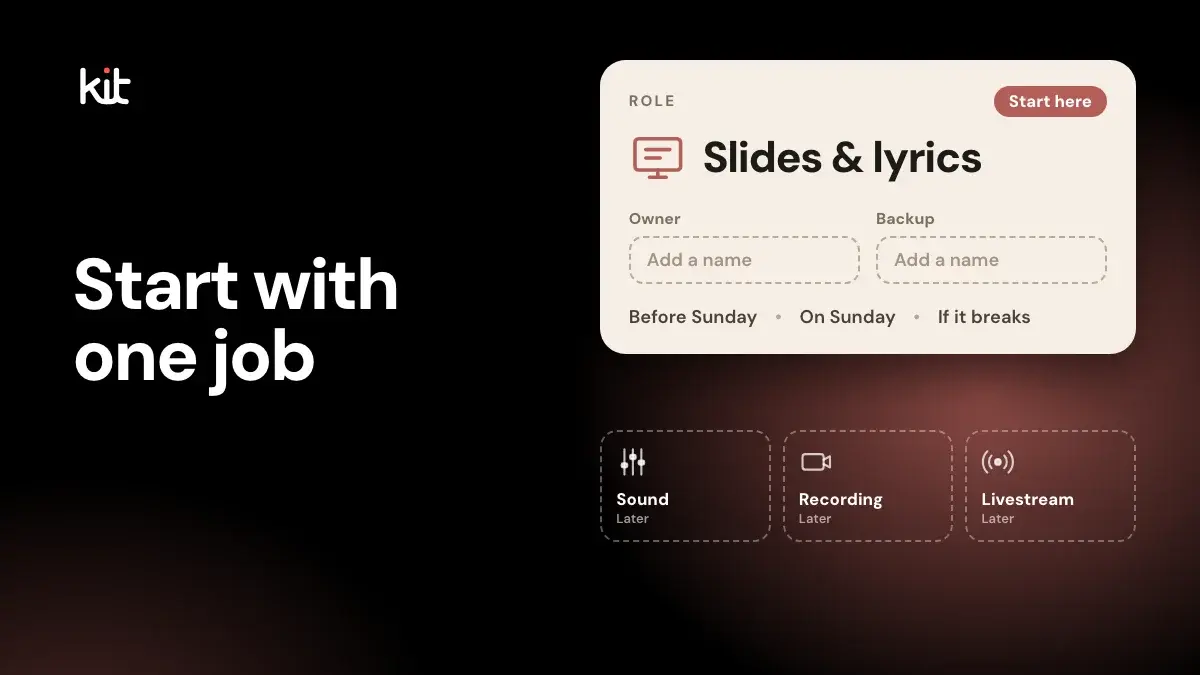
To start a church media team, pick one job the service needs every week, name one person to own it, write down the steps, and train a second person before you add anything else. Cameras, a livestream and social posts can wait until that first job runs without you.
This is the order of work for a small team of volunteers, from the first conversation to the first month. It is general practice, not a measured rule, so adjust it to your church. Read church media first if you want the bigger picture of what the work covers.
If you are the only one right now
Many teams start as one tired person. If that is you, do these four things this week:
- Drop to one job. Choose the job that matters most on Sunday, such as slides and lyrics, and let the rest go for now.
- Ask one person to cover one Sunday. Not a role. One Sunday, so they can see what it involves.
- Tell the pastor, in one sentence. For example: "I run the screens and sound alone every week. I need a second person trained so I can serve without being the only one. Can we find two this month?"
- If nobody says yes, say so plainly. Tell the pastor that one job is all the team can do this season, and ask again by name in a few weeks. You are allowed to do less. Serving one job well is better than five badly.
Everything below builds on those moves.
Free printable PDF
Healthy church media rules
What is inside
- Twelve short rules, each with one line for what it looks like on Sunday
- Honesty, permission before faces, care with children and hard moments, and prayer requests that stay private
- Copyright, captions and contrast, kind comment moderation, a day without posting and a pause plan for a crisis
- A sign-off for the pastor and the media lead, and notes for liturgical churches, several campuses, a solo volunteer and a school or daycare
Enter your email and confirm a code to download. We email you a copy the first time each day.
Step 1: Write down what the team is for
Pick one sentence the pastor agrees with. For example: "People in the room can read the words and hear the message, and people who miss a Sunday can catch up." When you are choosing a job or a purchase, ask whether it serves that sentence. A media ministry is this same work seen as service: sound, screens, video and online posts that help others take part.
Step 2: Choose one job to do well first
A common way for a team to stall is to start everything at once. Choose one of these:
- Lyrics and slides. The easiest to learn, and everyone in the room notices when it is wrong.
- Sound. Harder to fix by ear, and the job where a trained person helps most.
- Recording the message. A recording is also the raw material for later posts and clips.
Run that job the same way for several weeks before you add a second.
What the slides-and-lyrics job looks like on a Sunday. As general practice: arrive and open the service file, check it against the pastor's note (title, passage, announcements), put the first slide on the screen, advance one slide at a time as the service moves, and keep a second person beside you for the first few weeks. That is the whole job. Everything else is learning to do it calmly.
Step 3: Agree a weekly handoff with the pastor
Do this before you recruit anyone. Many mistakes in a media team trace back to missing information: the wrong service time, the wrong verse, a quote the pastor never said that way. Agree one weekly note with the sermon title, the passage, the announcements and the date, and decide who approves anything that goes public. A one-page version is in our guide to a simple handoff from pastor to volunteer.
Step 4: Ask for help by name
People say yes to a defined job and no to "help with media." MediaShout's 2025 guide to training volunteers suggests telling new people exactly what is expected: the responsibilities, how much time it takes, when to arrive and how rehearsal works. So when you ask, say the job, how often, and who will teach them. A short version you can use:
"Would you learn the slides for our Sunday service? It is one Sunday a month. I will train you for two weeks first, and you can stop any time."
Some practical points:
- Ask in person and by name. A direct invitation is harder to ignore than a stage announcement.
- Show the real job before they commit. Many people picture only slides or social posts.
- Teenagers can be strong on the screen and the camera. Pair them with an adult lead and follow your church's child-safety policy.
- Ask for a season, not a year, and tell them they can say no on any given week.
Step 5: Write each role down
A role is a one-page description: what the person does, what they need before Sunday, and who to call when something breaks. Copy this and fill it in:
Role: (for example, slides and lyrics) Owner: (name) Backup: (name) Before Sunday: (what you need from the pastor, and by when) On Sunday: (the steps, in order) If something breaks: (who to call, and the simplest fix)
Typical jobs in a church media team are slides and lyrics, sound, camera, livestream (broadcasting the service online), graphics and social posts, and a team lead. In a small church one person often holds several. What matters is that each job has a name next to it and a description someone else can follow. The church media guide lists the jobs and what each involves.
Step 6: Spend on gear last, and by job
Start with what the church already owns: a screen, a laptop, the sound system, a phone. Add equipment only when a specific job is held back by it, and buy by job, not by brand.
| Job | Start with | Upgrade when |
|---|---|---|
| Slides and lyrics | A laptop and free or built-in presentation software | Typing lyrics by hand becomes the weekly chore |
| Sound | The existing mixer (the desk that balances the microphones) and microphones, run by someone trained | A trained person can name what the room is missing |
| Recording | A phone on a stand, or one fixed camera | You need better picture or sound than the phone gives |
| Livestream | A laptop with free streaming software (OBS Studio is free and open source), a wired network connection if you can, and a test | The stream drops, or you need a second camera |
| Graphics and social | A free design tool, or a tool that drafts designs you can edit | The same graphic keeps being rebuilt by hand |
Two practical notes from general practice. Take the sound for any recording or stream from the mixer, not from a microphone in the room, which picks up echo and the crowd. And test the full setup, with the same people and equipment, before the first live Sunday.
For a stream, YouTube's help page says your video's bitrate (how much data it sends each second) cannot exceed your available upload speed, the speed at which your connection sends data out. It suggests keeping about 20 percent spare, and testing the whole setup before the event. The OBS quick start asks you to check your audio devices and run a test of several minutes before going live.
For the screen job, our presentation software comparison has dated prices. We do not list prices for the rest because they change; check each vendor.
Step 7: Before you stream or film, settle rights, consent and captions
Skip this step until you plan to stream or film. Then do it first. It is short, it is not legal advice, and the rights holders and your church's leadership decide what applies to you.
Music. Projecting lyrics and streaming a service are different permissions. CCLI, a licensing body many US churches use, says its Streaming License adds online worship to the Church Copyright License (the base license for using songs in services). It covers songs your own musicians perform live. For recorded tracks, CCLI offers Streaming Plus, which covers master recordings from its authorised sources only. Terms change, so read CCLI's current page before you stream.
Platform rules. YouTube's help page says it scans live streams for other people's content, warns you first, and may interrupt or end a stream if that content stays. Even a licensed stream can be interrupted unless the rights holder has allowed your channel.
Children and consent. Church guidance commonly asks for written parent or guardian permission before photographing or filming children, with a way for families to opt out. Practice varies by denomination and region, so ask the person who leads child safety at your church, and your insurer. MinistrySafe suggests matching the depth of a background check to how much access a volunteer has to children.
Captions. Captions help viewers who are deaf or hard of hearing. YouTube's help page, read on 29 October 2026, says its automatic live captions are English only, machine-generated, less accurate with poor audio or accents, and not available on every stream. The W3C's web accessibility guidelines (WCAG 2.2) include captions for live audio at their AA level. We are not saying a church is legally required to caption; captions are worth planning for.
Step 8: Train two people for each role
Train a second person for every role before you need one. Have them watch once, do it with help once, do it alone with the first person nearby, and then teach someone else. Two per role is a simple default. Hold a short rehearsal in the room before the first live Sunday and write down what you learned. Those notes become the one-page role description.
Step 9: Pick a weekly rhythm you can keep
Set your own call time and tell the team, as MediaShout advises, then adjust it if it does not work. Churches differ, so we give no standard. Here is one workable week, as an example:
| When | What happens |
|---|---|
| Early in the week | The pastor sends the handoff note. The team prepares slides and announcements |
| Before the service | Each person checks their setup and runs a test |
| During the service | Each role does its one job. One person is free to solve problems |
| After the service | Save the recording. Note anything that went wrong |
| Midweek | Make and review the week's posts, and thank the people who served |
If social posts are on your job list, the 52-week church media calendar and the one-sermon weekly workflow show a rhythm a small team can keep.
Step 10: Protect the people from burnout
Trade writers and vendors name the same causes: the same people serving every week and unclear expectations. Their fixes are a rotation, easy substitutions, a backup team and written role descriptions. These are practitioner views, not study results. Start with two: give each person a way to say no for a week, and thank them in person.
When the team grows
Once the first job is steady and you have people behind it, add three things: a team lead who runs the schedule, a rotating schedule so no one serves every week, and one person who owns the budget. Add the next job only when the first is steady.
Where Church Media Kit fits
Church Media Kit is built by a developer who volunteers on church media, and it helps with two parts of this list. Sermon to Social turns a pasted YouTube sermon link into editable social graphics and post text, and a person reviews and edits them. Sermon Slides turns a sermon into a presentation you can edit, present and download. It does not run sound or a livestream. The free Church Media Check shows where your team's time goes.
A first month, as an example
| Week | Focus |
|---|---|
| 1 | Write the one-sentence goal. Choose the first job. Agree the pastor's weekly note |
| 2 | Ask two people by name. Write that job's one-page role and run it with the first person while the second watches |
| 3 | The second person does it with help. Record the message with a phone if you do not already |
| 4 | Ask a third person by name. Add the next job only if this one is steady |
Frequently asked questions
How do you build a church media team?
Start with one job the service needs every week, such as slides and lyrics, and name an owner. Write down the steps, train a second person, then add the next job once the first is steady.
What does a church media team do?
It runs the screens, sound, cameras, livestream and graphics for services, and often makes the church's online posts. In a small church one person may hold several of these jobs.
What is a media ministry?
A media ministry is the team and tools that handle a church's audio, video, visuals and digital channels as part of its mission. It is the same work as a church media team, described as service.
How do you start a church media team with no money?
Use what the church already has: the screen, a laptop, the sound system and a phone on a stand. Free software such as OBS Studio helps for streaming. Add equipment only when a specific job is held back by it.
Do we need a license to stream worship music?
In the US, CCLI's Streaming License adds online worship to the Church Copyright License and covers songs your own musicians perform live. Streaming Plus covers recorded tracks from CCLI's authorised sources only. Terms change, so read CCLI's current page.
Do we need permission to film children?
Church guidance commonly asks for written parent or guardian permission and a way for families to opt out. Practice varies by denomination and region, so ask your child-safety lead and your insurer.
How do you stop volunteers burning out?
Rotate people, give each role a written description, make it easy to swap out, and thank people in person. Avoid scheduling the same few people every week.
Free printable PDF
Healthy church media rules
Twelve plain rules for what a church shares online and on screen, each with one thing to check on Sunday, a sign-off line for your pastor and media lead, and notes for liturgical churches, several campuses, a solo volunteer and a church with a school or daycare.
Enter your email and confirm a code to download. We email you a copy the first time each day.
Try Church Media Kit
Review what’s included and try the tools that fit your church’s workflow.
A free account needs no card. Sermon to Social, Sermon Clips and Sermon Slides each give one free use. That is one sermon, one upload up to 2 hours, and one AI presentation. Church in bio is free for 14 days after you first publish it. Design and Verse of the Day are free with any account. Review the offer when choosing your plan.